|
|
Sherlock
Consulting Limited |

OmniFlop Floppy Disk Driver & OmniFlop Wizard
User Guide
|
Document Type |
User Guide - Uncontrolled |
|
Document
Version |
3.2d |
|
Document
Reference |
User Guide.doc |
|
Date |
24 December 2023 |
|
Author |
Jason Watton |
|
Status |
Release |
|
Total Number of
Pages |
130 |
2023 Sherlock Consulting Limited
No part of this document may be reproduced or
transmitted, in any form or by any means (electronic, mechanical, photocopied,
recorded or otherwise) or stored in any retrieval system of any nature without
the express written permission of Sherlock Consulting Limited.
Contents
1. Introduction 4
1.1 Product Overview 4
1.2 Purpose 4
1.3 Scope 4
1.4 Readership 4
1.5 References 4
1.6 Acknowledgements 4
1.7 Glossary 5
1.8 History 5
1.9 Disclaimer of Warranty 14
2. Installation 16
2.1 System Requirements 16
2.1.1 External (USB) Floppy Drives 16
2.1.2 Disk Drive Calibration &
Compatibility 16
2.2 Components 17
2.3 Installation 17
2.3.1 Driver 17
2.3.1.1 Windows 2000 18
2.3.1.2 Windows XP 24
2.3.1.3 Windows Vista 39
2.3.1.4 Windows 7x86 (32-bit) 44
2.3.1.5 Windows 7x64 (64-bit) 63
2.3.1.6 Windows 8 (32-bit or
64-bit) 65
2.3.1.7 Windows 10 (32-bit) 65
2.3.1.8 Windows 10 (64-bit) 84
2.3.1.9 Windows 11 (64-bit) 87
2.3.2 Application 87
2.4 Removal 88
2.4.1 Driver 88
2.4.1.1 Windows 2000 88
2.4.1.2 Windows XP 88
2.4.1.3 Windows Vista 94
2.4.1.4 Windows 7 (32-bit or
64-bit) 94
2.4.1.5 Windows 8 (32-bit or
64-bit) 100
2.4.1.6 Windows 10 (32-bit or
64-bit) 100
2.4.1.7 Windows 11 (64-bit) 100
2.4.2 Application 100
2.5 Registration and Licensing 100
2.5.1 Justification 100
2.5.2 Licensing Strategy 100
2.5.3 Getting a License 101
3. User Guide 102
3.1 Supported Formats &
Discoverers 102
3.2 Formatting Disks 110
3.3 Running OmniFlop 111
3.4 Welcome Page 111
3.5 Function Selection 112
4. Support 113
4.1 Things to Check 113
4.1.1 Hardware 113
4.1.2 Floppy Disk 113
4.1.3 Single Density Support 113
4.1.4 Software 114
4.2 The Ideal Test Environment 114
4.3 The driver "does not contain
any information about your hardware" 114
4.4 The media in the drive cannot be
read 115
4.5 "Incorrect Function"
Error Message 115
4.6 It won't work with my [external
USB] floppy disk drive 115
4.7 How do I install a 5¼" [internal] floppy disk
drive? 115
4.8 How do I install a 3½" [internal] floppy disk
drive? 118
4.9 How do use a 3"
[single-sided] floppy disk drive? 120
4.10 Nothing was found 120
4.11 The formatting works and it works in
my old equipment but OmniFlop cannot read it 121
5. Using OmniFlop With Your Software 122
5.1 List The Formats You Need To Use 122
5.2 Contact The Author 122
5.3 Install The New Driver 123
5.4 Enable The Formats 123
5.5 Access The Floppy Disk 124
5.5.1 Disk Order 124
5.5.2 Ensoniq SQ80 Format 125
5.5.3 iSlogger DDCPM Format 125
5.5.4 Computer Automation LSI-2 Format 125
5.5.5 FLEX Double-Density Formats 125
5.6 Close all Access to the Floppy
Disk 125
5.7 Disable The Formats 125
5.8 Formatting a Disk 125
5.9 Locking The Media Type 126
5.10 Unlocking The Media Type 127
5.11 Disabling/Enabling Read/Write Access 127
5.12 Opening For Formatting 128
5.13 Closing The Format 129
5.14 Formatting Tracks 129
1. Introduction
1.1 Product Overview
OmniFlop is a utility suite for accessing non-standard floppy disk formats in a standard PC. This is useful for archiving and resurrecting ancient data formats and floppy disks.
1.2 Purpose
This document is the User Guide for the OmniFlop utility suite.
1.3 Scope
This guide covers installation of the OmniFlop floppy disk driver and use of the OmniFlop Wizard application.
1.4 Readership
This document is targeted at any person involved in using the OmniFlop utility.
1.5 References
|
Ref |
Title |
Author |
|
|
|
|
1.6 Acknowledgements
This document is a first edition.
The product and this document owe credit to:
Jason Watton for authorship.
Chris Richardson (http://www.8bs.com) for testing, encouragement, and support.
Jonathan Graham Harston for extensive and unique information about alien disk formats.
The Stairway To Hell website (http://www.stairwaytohell.com).
alchresearch on The Stairway To Hell forum, and at http://www.alchemistresearch.com
Robert Schmidt and "The BBC Lives!" (http://bbc.nvg.org).
The BBC Micro community via the BBC Micro Mailing List.
Peter Edwards for offering me a beer.
Paulo Gomes for telling me about compatibility with Shima Seiki sewing machines.
Tim Felgate, Darren Atkinson, and Markus Dimdal for reporting the vital format statistics.
Garth Hjelte for incredible patience dealing with DD Ensoniq disks.
Paolo Bagnaresi for extensive TI-99/4A testing, development, and the screen shots of Vista and Windows 7 Ultiimate.
Martyn Lovell for testing and manifest advice for
Christof Kauer of ipcas GmbH for feeding me formats and feedback for their USB Floppy Emulator (http://www.ipcas.com/products/usb-floppy-emulator-fdd-to-udd.html), and providing me with a prototype.
Others who have tried, tested, and used previous versions of OmniDisk and OmniFlop.
Those rightly disgruntled by being missed off this list ‑ tell me (I'm sorry).
All of the above have the right to be identified where appropriate as authors of their respective works.
1.7 Glossary
Definitions in the text are shown italicized and bold. Use of terms recently defined elsewhere or a direct quote from elsewhere in the text are shown italicized. Bold and underlining are used for emphasis.
|
API |
Application Programmer's Interface, a set of functions and declarations which provide the programmer of an application to use an object. |
|
BIT |
Built-In Test |
|
Hex |
Hexadecimal |
|
Rx |
Receiver/Reception |
|
Tx |
Transmitter/Transmission |
|
mC |
Micro-controller. |
|
mP |
Microprocessor. |
|
USB |
Universal Serial Bus - an electrical and signaling standard plus protocol for device communications. |
1.8 History
The following versions of OmniFlop have been released:
|
Date |
Details |
|
31st Dec 2004 |
v0.01 Beta Release: Supports: • 5¼" 360kB drive: Standard DOS formats
only • 3½" 720kB drive: Standard DOS formats only • 5¼" 1.2MB drive: Extended formats
(see below) • 3½" 1.44MB drive: Extended formats (see below) • 3½" 2.88MB drive: Standard DOS
formats only • Standard x86
system architecture: Extended formats (see below) • NEC 98 system architecture: DOS formats
only • 5¼" 360kB drive: DOS 160kB • 5¼" 360kB drive: DOS 180kB • 5¼" 360kB drive: DOS 320kB • 5¼" 360kB drive: DOS 320kB x1024 • 5¼" 360kB drive: DOS 360kB • 3½" 720kB drive: DOS 720kB • 5¼" 1.2MB drive: DOS 160kB • 5¼" 1.2MB drive: DOS 180kB • 5¼" 1.2MB drive: DOS 320kB • 5¼" 1.2MB drive: DOS 320kB x1024 • 5¼" 1.2MB drive: DOS 360kB • 5¼" 1.2MB drive: DOS 720kB • 5¼" 1.2MB drive: DOS 1.2MB • 5¼" 1.2MB drive: (Extended) BBC DFS
40 (100kB/200kB) [Chris Richardson] • 5¼" 1.2MB drive: (Extended) BBC DFS
80 (200kB/400kB) [Chris Richardson] • 5¼" 1.2MB drive: (Extended) BBC DDOS
360kB (1-side) [Chris Richardson] • 5¼" 1.2MB drive: (Extended) BBC DDOS
720kB [Chris Richardson] • 3½" 1.44MB drive: (Extended) BBC DFS 40 (100kB/200kB)
[Chris Richardson] • 3½" 1.44MB drive: (Extended) BBC DFS 80 (200kB/400kB)
[Chris Richardson] • 3½" 1.44MB drive: (Extended) BBC DDOS 360kB (1-side) [Chris
Richardson] • 3½" 1.44MB drive: (Extended) BBC DDOS 720kB [Chris
Richardson] • 3½" 1.44MB drive: DOS 720kB • 3½" 1.44MB drive: DOS 1.44MB • 3½" 2.88MB drive: DOS 720kB • 3½" 2.88MB drive: DOS 1.44MB • 3½" 2.88MB drive: DOS 2.88MB |
|
2nd Jan 2005 |
v0.02: • Extended formats disabled by default |
|
2nd Jan 2005 |
v0.03 Beta Release: • Simple Analysis (Test) support added for all drive types. • Enhanced error reporting in Wizard. |
|
11th Jan 2005 |
v0.04 Beta Release: • Enhanced Analysis algorithm - changed to distinguish between formats and sub-formats (e.g. 720kB/640kB) and check tracking. • Analysis support for NEC98 x86 system architecture (all drive types). • All drive
types: Custom format added for readable unrecognised formats. • Read/Write of
custom (unrecognized) formats added. • 'Test'
function tries to match format & advises of type of read/write to use. • Format option
added but not implemented. • Pre-defined
formats extended ‑ now covers: • (Extended) BBC DFS 40 (100kB single
sided/200kB double sided) • DOS 160kB • DOS 180kB • (Extended) BBC DFS 80 (200kB single
sided/400kB double sided) • DOS 320kB • DOS 320kB (1024 bytes/sector) • (Extended) BBC DDOS 360kB (single
sided) • DOS 360kB • (Extended) BBC ADFS L 640kB • (Extended) CP/M-80 / PDOS 640kB • (Extended) BBC DDOS 720kB • Spectrum +3 CP/M 720kB • Atari ST DSDD 720kB • Amstrad CP/M 720kB • DOS 720kB • (Extended) BBC ADFS D, D+, E, E+
800kB [Chris Richardson] • (Extended) Spectrum Miles Gordon Tech +D/Disciple 800kB [Andy J.Davis, Thomas Heck] • (Extended) DOS 800kB • DOS 1.2MB • (Extended) BBC ADFS F, F+ 1600kB
[Chris Richardson] • DOS 1.44MB • DOS 2.88MB • User Guide updated to include Windows 2000 installation. |
|
12th Feb 2005 |
v1.00 Release: • Format option
implemented for all pre-defined formats. • Pre-defined
formats amended for GPL (format) and GSL (read/write). • Licensing
added (levels All, Format, BBC, Other, Custom). • User
selections stored between runs for use as default. • Added to
pre-defined formats: • (Extended) BBC ADFS S 160kB [Chris
Richardson] • (Extended) BBC ADFS M 320kB [Chris
Richardson] • (Extended) BBC Master 512 DOS Plus
800kB [Chris Richardson] • (Extended) BBC Z80 CP/M Acorn 400kB
[Chris Richardson] • (Extended) ZX Spectrum TR-DOS 640kB
[Art] • Corrected
pre-defined formats: • DOS 360kB (3.5" 1.44MB FDD) |
|
27th Mar 2005 |
v1.01 Limited release: • Over-sampling
added (to cope with 82-track formats). • Under-tracked format detection corrected (e.g. 35-track). |
|
4th Apr 2005 |
v1.02 Release: • Deflect
attempts to mount drive when non-standard format is present. • Added/changed
pre-defined formats: • (Extended) 3.5" BBC ADFS L
640kB [Chris Richardson] • (Extended) 5.25" BBC ADFS L
640kB [Tim Felgate, Mark Ferns] • (Extended) Tandy CoCo RSDOS
single-sided 157.5kB [Darren Atkinson] • (Extended) Tandy CoCo RSDOS double-sided 315kB [Darren Atkinson] |
|
22nd Apr 2005 |
v1.03 Release: • Remove licensing from all confirmed formats and functions (i.e. Format) to date. |
|
9th Sep 2005 |
v2.00a Release: • Redesign of user interface to reduce errors. • Reading/writing formats first always tries pre-defined formats, as per v0.03. • User chooses from all possible matching formats before reading/writing the disk. • Addition of Diagnostics Page. • Addition of Licensing Page. • Added formats: • SJ Research MDFS [Mark Ferns] • Akai S900 DD [Markus Dimdal] • DEC Rainbow [Paul Hughes] • Akai MPC 60 MK II [Dale Henriques] • Master 512 DOS [Chris Richardson] • Sinclair QL QDOS [Ali Booker] • Philips P2000C CP/M [Jason Watton] • Stride PDOS [Jason Watton] • ZEISS Spectrophotometer Specord
M400 [ • Shima Seiki knitting machine DS DD [Paulo Gomes, Kathy Newey] • ABB/Asea Robot [Daniel C. Hayden] • BBC Master 512 DOS [Chris Richardson] • IBM 360kB Torch Graduate [Chris Richardson] • Akai MPC 60 MK II [Dale Henriques] • Akai S1000 HD [Markus Dimdal] • Akai S3000 HD [Markus Dimdal] • Akai S950 HD [Markus Dimdal] • Ensoniq ASR-10 HD [Markus Dimdal] • Ensoniq EPS 16+ [Matt Savard] • Spectrum 128 Beta 128 [Walter G Hertlein] • NEC PC9801 UV, NEC FC9801 V DMF HD [Christopher J.M. Robertson] |
|
14th Sep 2005 |
v2.00b Release: • Added
further diagnostic options. |
|
14th Sep 2005 |
v2.00c Release: • Added
'Disk map' diagnostic option. |
|
20th Sep 2005 |
v2.00d Release: • Added 'Test BIOS drive types'. • Enhanced
'Get disk map' and 'Test disk'. |
|
26th Sep 2005 |
v2.01a Release: • Enhancements
in preparation for use with external 3rd-party programs. • Added version
check on driver. • Added support
for SFManager. |
|
27th Sep 2005 |
v2.01a Release (documentation update): • Format naming
standardised. • Format lists
updated in Wizard and documentation. • Minor GUI
changes to Wizard. • Added support
for Awave Studio. |
|
30th Sep 2005 |
v2.01b Release: • Added 1.722MB
DOS format. • Added
Electroglas Wafer Probers CP/M format. • Added support
for 3rd-party Electroglas format. • Corrected
e-mail use of '?' in automated e-mailing. • Enhanced
OmniFlop Disk Map (*.ofm) format. |
|
17th Oct 2005 |
v2.01c Release: • Further
enhancements to disk mapping. • Head settle
time corrected on some seeks. |
|
19th Oct 2005 |
v2.01d Release: • Further
enhancements to disk mapping. • Head settle
time corrected on some seeks. • Added ZX
Spectrum BetaDisk 40S format [Roberto Jose] • Added ZX
Spectrum BetaDisk 40D format [Roberto Jose] • Added ZX
Spectrum BetaDisk 80S format [Roberto Jose] • Added ZX
Spectrum BetaDisk 80D format [Roberto Jose] • Added DOS
1.232MB format [pstaszkow] • Split current
Tandy CoCo RS-DOS format into separate 48TPI and 96TPI formats. • Amended Tandy
CoCo RSDOS single-sided 48TPI 157.5kB [Darren Atkinson] • Amended Tandy
CoCo RSDOS double-sided 48TPI 315kB [Darren Atkinson] • Added Tandy
CoCo RSDOS single-sided 96TPI 157.5kB [Darren Atkinson, Benoit Bleau] • Added Tandy
CoCo RSDOS double-sided 96TPI 315kB [Darren Atkinson, Benoit Bleau] • RadioShack CoCo OS9/Nitros9 single-sided 40-track 48TPI (180kB) [Benoit Bleau] • RadioShack CoCo OS9/Nitros9 double-sided 40-track 48TPI (180kB) [Benoit Bleau] • RadioShack CoCo OS9/Nitros9 single-sided 40-track 96TPI (180kB) [Benoit Bleau] • RadioShack CoCo OS9/Nitros9 double-sided 40-track 96TPI (180kB) [Benoit Bleau] • RadioShack CoCo OS9/Nitros9 single-sided 80-track (360kB) [Benoit Bleau] • RadioShack
CoCo OS9/Nitros9 double-sided 80-track (360kB) [Benoit Bleau] • Reset default File Format if format changes. • Refresh the
list of File Formats with those most commonly used. • Correct the
File Formats offered for a generic single-sided format. • Added support
for 3rd-party |
|
1st Dec 2005 |
v2.01e Release: • Added support
for Rubber Chicken Software Co. software (Ensoniq MID-Disk Tools,
Ensoniq Disk Tools, Ensoniq ASR-X Tools, Translator). • Added warning
to 'Get a license' to use the program first. • Added file
format '*.adf' for single-sided Acorn ADFS. • Added initial
warning about disabling anti-virus software. |
|
10th Jan 2006 |
v2.01f Release: • Added E-mu Emax 800kB [Garth Hjelte] • Added E-mu EOS
1440kB [Garth Hjelte] • Added E-mu ESi
[Garth Hjelte] • Added Oberheim DPX [Garth Hjelte] • Added Prophet 2002 [Garth Hjelte] • Added Ensoniq Mirage [Claude Climer] • Added Korg DSS-1 [Claude Climer] • Added Spectrum Opus Discovery [Simon Owen] • Added Korg
T-series (T1, T2, T2EX, T3, T3EX) format [Dominic Guss] • Added |
|
29th Jan 2006 |
v2.01g Release: • Added Dynacord
[Garth Hjelte] • Improved 'skip
bad sectors' • Added HP-2100
8" [Dave White] • Added Mori
Seiki DS DD 648kB [Thean Low] |
|
20th Feb 2006 |
v2.01h Release: • Added support
of .D81 file format [JackLT] • Added Amstrad
System (SS/DS) [Karl Kopeszki] • Added Amstrad
Data (SS/DS) [Karl Kopeszki] • Added Amstrad System/Data DS and Data/System DS [Karl Kopeszki] |
|
30th May 2006 |
v2.01i Release: • Added Thomson TO9 3.5" 640k format • Added support
for ensDT (Ensoniq Disk Tools) • Added Korg
01/W format. • Altered E-mu
EMAX format for compatibility with EMAX-I [Kris VC] • Added
RadioShack CoCo NitrOS9 80trk DS (720kB) variant [Bob Devries] • Added on-line licensing |
|
27th Jul 2006 3rd Sep 2006 4th Oct 2006 |
v2.01j Release: • Added support for EMXP/EMXPN • Added • Added support for ensDT. • Added Balzer Metal Evaporator format
[Richard Scott, Dynex Semiconductors] • Added Alesis
Datadisk [Donal Ryan] • Added DOS
640kB format [Malcolm Sargent] • Added DOS
1.743MB format [kalman] |
|
3rd Nov 2006 4th Nov 2006 15th Nov 2006 |
v2.01k Release: • Added 3.5" HP-2100 format [Patrice
Leonard] • Added Atari ST
SSDD format [Mark "alfspanners"] • Added support
for EnsoniqFS. • Added Slow
Step Rate option. |
|
2nd Sep 2007 |
v2.01m Release: • Formatting
reliability improved. • Added DOS 729kB format [Gutbrod András] • Added Beli disk format [Igor
Živanović] • Changed names
of • Enabled
support for Rubber Chicken Software Co. software. • Added Applix 1616 800kB, 810kB, 820kB [Bob
Devries] • Added Sharp X68000 1248kB format [Charles
Doty] • Added Atari 8-bit 90kB [Charles Doty] • Added unnamed 180kB format [Shawn Howell]
(unproven) • Added Tatung Einstein TC01 Xtal Dos 1.31
40-track DS 400kB & 40-track SS 200kB [Chris Coxall] • Added unnamed 144kB format [Brian
"Briza" Palmer] • Added OS-9/68K
3.5" DD 38W7 format [Andrey Gritzenko] • Added Spectrum
DISCiPLUS 40-track [Dario Ruellan] • Added unnamed
360kB format [Ralph Hänsel] • Added LIF 1232kB
disk format [Bruce] • Added ABB/Asea
Robot IRB L6/0293 41-track format [Toon Lettink] • Added Atari ST
SS 320kB format [Bob Devries] • Added HP 9121
format [Chuck Magee] • Added COMX DOS
formats [Dennis Heijmans, Marcel van Tongeren] • Added file
type Roland S50/550/W30/S7xx image • Added file
type Roland S50 image • Added HP-9000
Series 310 616kB format [Jason Watton] • Added missed
5.25" 360kB DOS-compatible formats. |
|
26th Feb 2008 |
v2.01n Release: • Added Panasonic KX-W940 Word Processor
Typewriter format [Richard Holdaway] • Removed
licensing for EMXP/EMXPN • Removed
licensing for Rubber Chicken Software • Fixed failed
auto-detect on some PCs of the format after
an 'over-tracked' format, e.g. ASR-10 fails to be recognised. |
|
N/A |
v2.01o Release: • Added beta Computer Automation LSI-2
mini-computer format [Lars Hamren] (Wizard only) |
|
14th May 2008 |
v2.01p Release: • Fixed Ensoniq
Mirage format • Fixed Ensoniq
SQ80 format • Fixed Oberheim
DPX format • Fixed Prophet
2002 format • Changed all
references of 'EMu' to 'E-mu'. • Added Tandy
TRS-80 Model 1 NEWDOS/80 v2.0 40-track 100kB format • Added
GravoGraph VX format [Norman Bruggner] • Added Atari
Power Up Plus format [Norman Bruggner] • Added support
for RSX2MS program. • Added support
for AkaiS20 program. • Added ABB/Asea
IRB2000 format [Rob Bos] • Added
Korg DSM-1 [Doug Skinner] |
|
9th Sep 2008 4th Oct 2008 21st Oct 2008 25th Oct 2008 1st Nov 2008 |
v2.01q Release: • Added
Sequential Studio 440 [Dazzer] • Added TRS-80
Model 1 NEWDOS/80 v2.0 77-track 385kB [Terry Stewart] • Added Tandy
RSDOS 2.3 87.5kB [Terry Stewart] • Added CP/M 2.2
80/10x1024 800kB [Dave Timmins] • Added HP-9121
DS 664kB format [Ian & Jo Andrews] • Fixed ABB/Asea
IRB2000 format [Rob Bos] • Added Mecmor
Variatex 2500 1280kB [Anton Sinovitch] • Fixed
Gravograph VX [Norman Bruggner] • Added BBC DFS
83-track DS format [Electronic Workshop, University of Sheffield] • Added RCA
Micro Floppy System 315kB [Berni Meier] • Added CNI NC481
720kB [Kamil Murin] • Added DOS
1.701MB DTMF format [Lindsay Hargreaves] • Added Automatix
RobotControl RAIL 400kB [Johan M Lundstrom] • Added unknown
Media400x1024_0 400kB format [Taking the 5th!] • Added ABB/Asea
Robot IRB L6/0293 3½" conversion [Leotta Domenico] • Changed
interleave on Automatix RobotControl RAIL 400kB [Johan M Lundstrom] • Added TRS-80
Model 1 NEWDOS/80 v2.0 68-track 340kB [Terry Stewart] • Added HP-1000
format [Lawrence Uchida] • Added E-mu
EIII 800kB format [Alexander Burgwedel] • Added Ensoniq
SD-1 800kB format [Danyel Gloser] • Added Heath
H-89 HDOS 600kB partial format [Rich Lentz] • Added Heath
H-89 HDOS 640kB format [Rich Lentz] • Added TV3102
Controller Programmer [Ian Sharpe] • Added
Exelvision [Fabien Neck] |
|
18 Nov 2008 |
v2.01r Release: • Interleave
checked for matching formats - perfect match returned if possible, otherwise
first (1:1) used. • Improved
Exelvision format (gaps) • Removed
duplicate Exelvision format (leaving only interleave 7:1) • Added
independent Heath H-89 CP/M 2.2 I3 800kB [Rich Lentz] • Added FM77L4
320kB format [Eginer (Tecnoginer S.L.)] • Added Hector
CP/M 200kB format [Yves Fontanes] • Added Hector
CP/M 720kB format [Yves Fontanes] • Added Hector
CP/M 800kB format [Yves Fontanes] • Added Timex
2048 FDD3000 single-sided (160kB) format [Michal Tarasiejski] • Added Timex
2048 FDD3000 double-sided (320kB) format [Michal Tarasiejski] |
|
19 Nov 2008 2 Dec 2008 |
v2.2a Release: • Added OmniFDC
driver. • Tandy TRSDOS
2.3 (87.5kB) modified to accommodate the curious track 17. • Reg Codes and
License Keys presented in Courier New for easier transposition if necessary
(withdrawn). |
|
12 Feb 2009 04 Mar 2009 |
v2.2b Release: • 4th year
anniversary of v1.00 release. • Added
universal license to cover all others. • Added HP-9000
Model 362 1540kB format [Kelvin Lee] • Added Thomson
T08-T09 series 320kB format [Norman Bruggner] • Added Osborne
1 (O1) SSSD 100kB format [Theodore (Alex) Evans] • Added Osborne
1 (O1) SSDD 200kB format [Theodore (Alex) Evans] • Added Osborne
Vixen (O4) DSDD 400kB format [Theodore (Alex) Evans] • Removed
licensing on all but the
following formats: • Custom/Unknown • Formats listed as 'New' on web page
(i.e. those added for v2.2a and v2.2b only). • Added GEM
S2/S3 synthesizer 1600kB format [Alexander Burgwedel] |
|
12 May 2009 27 Jun 2009 31 Jul 2009 26 Aug 2009 24 Oct 2009 25 Nov 2009 |
v2.2c Release: • Added TI-99/4A
formats: • TI-99/4A SS/SD 40T SngStep 90kB
[Paolo Bagnaresi] • TI-99/4A SS/SD 40T DblStep 90kB
[Paolo Bagnaresi] • TI-99/4A DS/SD 40T SngStep 180kB
[Paolo Bagnaresi] • TI-99/4A DS/SD 40T DblStep 180kB
[Paolo Bagnaresi] • TI-99/4A SS/DD 40T SngStep 180kB
[Paolo Bagnaresi] • TI-99/4A SS/DD 40T DblStep 180kB
[Paolo Bagnaresi] • TI-99/4A DS/DD 40T SngStep 360kB
[Paolo Bagnaresi] • TI-99/4A DS/DD 40T DblStep 360kB
[Paolo Bagnaresi] • TI-99/4A SS/HD 40T SngStep 360kB
[Paolo Bagnaresi] - needs OmniFDC
driver • TI-99/4A SS/HD 40T DblStep 360kB
[Paolo Bagnaresi] - needs OmniFDC
driver • TI-99/4A DS/HD 40T SngStep 720kB
[Paolo Bagnaresi] - needs OmniFDC
driver • TI-99/4A DS/HD 40T DblStep 720kB
[Paolo Bagnaresi] - needs OmniFDC
driver • TI-99/4A SS/SD 80T 180kB [Paolo
Bagnaresi] • TI-99/4A DS/SD 80T 360kB [Paolo
Bagnaresi] • TI-99/4A SS/DD 80T 360kB [Paolo
Bagnaresi] • TI-99/4A DS/DD 80T 720kB [Paolo
Bagnaresi, Bill R Sullivan] • TI-99/4A SS/HD 80T 720kB [Paolo
Bagnaresi] - needs OmniFDC driver • TI-99/4A DS/HD 80T 1440kB [Paolo
Bagnaresi, Bill R Sullivan] - needs
OmniFDC driver • TI-99/4A SS/DD 40T SngStep 160kB
[Paolo Bagnaresi] • TI-99/4A SS/DD 40T DblStep 160kB
[Paolo Bagnaresi] • TI-99/4A DS/DD 40T SngStep 320kB
[Paolo Bagnaresi] • TI-99/4A DS/DD 40T DblStep 320kB
[Paolo Bagnaresi] • TI-99/4A SS/DD 80T 320kB [Paolo
Bagnaresi] • TI-99/4A DS/DD 80T 640kB [Paolo
Bagnaresi] • Automated
audit performed - inconsistencies found: • Changed GSL on FX_OSBRN1_200 (all
but 5.25" 1.2MB drive) • Changed GSL on FX_OSBRN4_400 • Changed GSL on FX_HP1000 • Changed GPL on FX_IBM_DOS1232 (all
but 3.5" 1.44MB drive) • Changed GPL on FX_RCA_MFS on 1.2MB
5.25" • Changed GPL on FX_HEC_CPM_200 • Changed GPL on FX_APPL1616_810
(3.5" 1.44MB) • Changed GPL on FX_APPL1616_820
(3.5" 1.44MB) • Changed GSL on FX_AMS_SYS_SS • Changed GSL on FX_AMS_SYS_DS • Changed GSL on FX_AMS_DATA_SS • Changed GSL on FX_AMS_DATA_DS • Changed GSL on FX_AMS_DATA_SYS • Changed GSL on FX_AMS_SYS_DATA • Changed GSL on FX_IBM_DOS180 • Changed GSL on FX_IBM_DOS360 • Changed GSL on FX_HANSEL • Changed GSL on FX_AKAI_S950_HD for
5.25" 1.2MB • Changed GSL and skew on FX_BALZER
as per 3.5" 1.44MB • Changed GPL on FX_BBC_DOS_PLUS
(except 5.25" 1.2MB) • Corrected PAD on FX_SPEC_BETA40S • Corrected number of heads on
FX_THOMSON_T08T09 for 1.2MB 5.25" • Corrected number of heads on
FX_SPEC_BETA80S for 1.2MB 5.25" • Changed GSL on FX_SPEC_DiP_40 on
5.25" 360kB • GPL for 5.25" 1.2MB
FX_DYNACORD, FX_ENS_COMP_HD, FX_ENS_ASR10, FX_ENS_ASR10_SP, FX_ENS_TS12 corrected. • Corrected GSL & GPL for
FX_CPM22_CTS_800 • Pad character for NEC98
architecture all but 5.25" 360kB drive changed from e5 to f6 (all
formats) as per standard architecture • FX_SPEC_BETA80D interleave
corrected to 1:1 • Added Slogger
DDCPM format [Dave Moore] plus file formats with and without padding • Completed Computer Automation LSI-2 mini-computer
format [Lars Hamren] (100% driver-based) plus added file formats with and without padding • Added FLEX
formats [Ron Bihler, Ian Blythe, Michael Evenson, Dell W. Setzer] plus FLEX
.dsk file format • Added DEC RX02
1001kB format [Nikolay Degtev] • Added Didaktik
D40 360kB & D80 720kB formats [Pavel Chromy] plus .d80 file format • Added Zenith
ZDS ZDOS 360kB and CP/M-86 (320kB) formats [Steven White] • Added Balzer
Ophthalmic Lens Machine (250.25kB) format [Carlos Sánchez] • Added IMS MM/1
(1280kB) format [Bob Devries] • Added
Gravograph ISIS 640kB format [Patrick Poncet] • Added Data
General/1 199.5kB format [Josef Havlik] • Added 4th
Dimension 799.75kB format [Wocki] • Added OS-9
1010.75kB format [Georg Woltersdorf] • Added OS-9
Universal 632kB format [Bob Devries] • Added SATIM
560kB format [Florian Peth] • Recording of
default user choices simplified (no separate R/W and Format choices) • Drive/Media
locking improved for faster forced formats • File format
choice recorded as string so it can be used with more than one disk format • Added filter
to disk format selection to reduce number of formats offered • Added Stäubli/Unimation Puma 560c Robot Arm Controller 640kB format [Mike Ward-Theatronics] • Removed Toshiba Libretto support from FDC driver. • Added support
for Paolo's TI-99/4A program. • Removed all
format-specific 3rd-party licensing • Tested on
Vista32 and Windows 7 Ultimate OK [Paolo Bagnaresi] • Added
installation section for Vista and Windows 7 Ultimate [Paolo
Bagnaresi] • Added HP110 portable 693kB format [Tom Szolyga] • Added manifest
for Vista and Windows 7 Ultimate [Martyn Lovell] • Added Oric Jasmin/Jasmin II (340kB, 348.5kB, 357kB) formats [Wilfrid Avrillon] • Added Dynacord ADD-one 840kB format [Roland Weihmayer] • Added full list of possible formats to a successful Diagnostic/Test Disk • Added Prophet 2000 420kB and 840kB formats [Kris ///E-Synthesist] • Added Casio FZ-20M (1280kB) format [Chris Strellis, Dr. Georg Müller, Rainer Buchty] • Added Tavernier 6809 (90kB, 170kB) formats [Thierry Hennuyer] |
|
06 Dec 2009 |
v2.2d Release: • Fixes to
Prophet 2000 format. • Fixes to
Tavernier 6809 DD (170kB) format |
|
07 Apr 2010 |
• Added Simmons
SDX (1280kB) format [Garth Hjelte] |
|
10 Jun 2010 |
• Changed
interleave for Computer Automation LSI-2 format to 2 • Added NEC
FC9801 997.75kB format [Chris Paice] • Added Tatung Einstein TC01 Xtal System 5 80-track
800kB [Phil Simmons] |
|
04 Oct 2010 |
• Removed
licensing from Computer Automation LSI-2 for Chris Paice • Added Hitachi
Bio-chemical Analyzer 1040kB format [M. Heidari] • Added Sharp X68000
77-track 1232kB format [Papa November] • Enhanced strength
of 'Skip Bad Sectors' to cover all possible errors • Added 'Ignore
DDAMs' option |
|
26 Oct 2010 |
• Added IGM 6012
DD and HD formats (800kB) |
|
16 Nov 2010 |
v2.3a Release: • Upgraded from
legacy DDK (2600.1106) to latest (7600.16385.1) • Resolved all
problems with 64-bit use • Added file
format '.TRD' for TR-DOS to selection • TR-DOS 640kB
format interleave adjusted |
|
23 Mar 2011 |
v2.3b: • Cosmetic
release to help support TR-DOS changes • Changed
interleave for Stride PDOS • Added Stride
p-System (640kB) • Added Stäubli
JC3 JC4 JC5 (Jacquard Control) 1.44MB format [Christof Kauer, ipcas GmbH] • Added NEC
PC8801 359.5kB format [Víctor Jiménez Pérez] • Enhanced
auto-ID algorithm for non-uniform formats • Added Nestal
Synergy 800-110 690.5kB format [Christof Kauer, ipcas GmbH] • Added ZX
Spectrum TR-DOS 1-head 640kB format [Micky Elima] • Added Okuma
OSP 1458kB format [Christof Kauer, ipcas GmbH] |
|
13 Jul 2011β 18 Sep 2011 |
v3.0a: • Rationalised
database into one coherent list covering all drive types • Added Cloos
Rotrol 16 720kB format [Christof Kauer, ipcas GmbH] • Added IBM OS/2
XDF 1840kB format [Robert McMurray] • Added ASM
Epsilon 2000 Epi Reaktor 1440kB format [Christof Kauer, ipcas GmbH] • Added Schiess-Nassovia
Optimat 505 520kB format [Christof Kauer, ipcas GmbH] Withdrawn 22 Nov
2011 in favour of v3.0b - ASM Epsilon format often confused with DOS 1.44MB
format. |
|
31 Oct 2011β 21 Nov
2011β 22 Nov
2011β 23 Nov
2011β 12 Jan 2012 03 May 2012 |
v3.0b: • Added Greco
Systems EZ-FILE 41-track 410kB and Greco Systems EZ-FILE 81-track 810kB
formats [Robert M. Woodruff] • Added Hashima
Model HSQ-88NC 720kB format [Yurij Usoltsev] • Added Tracer/ST
0-based and 1-based 1.44MB format [Jerry L. Hallett] • Fixed
mistaking 1.44MB DOS HD format for ASM Epsilon 2000 Epi (introduced in v3.0a)
due to BPB on interpreted disk data - only affects DOS/BPB formats other than
720kB. • Added Format-Write
combined function. • Added option
to repeat operation at end for mass production. • Added 18x128,
9x256 and 5x512 test formats [Cosimo Oliboni]. • Added Singer
9000 format [Maureen Kitching]. |
|
03 May 2012 22 Sep 2013 05 Oct 2013 |
v3.0c: • Added
"Incorrect Function" potential solution to User Guide [Maureen
Kitching] • Corrected
interleave on Alesis Datadisk format [Dave "roses2at/blackbox"] • Changed name
of duplicated "Ensoniq EPS, ASR-10 & compatibles DD-disk" to
"Ensoniq EPS, ASR-10 & compatibles Special DD-disk" |
|
15 Sep 2017 22 Sep 2017 25 Sep 2017 26 Sep 2017 28 Sep 2017 21 Aug 2020 06 Aug 2023 |
v3.1a: • Corrected
interleave on all AMSDOS System and Data formats • Added XP
visual style/theme support to Wizard (possible fix to 'Incorrect Function') • Added ICL
DRS8801 CPM-86 format [Malcolm Surl, LuxSoft] • Added
installation instructions for Windows 8 and Windows 10 • Replaced
legacy OFL_DRIVE_TYPEs in favour of internal DRIVE_TYPEs (defined in
OmniFlopDrvTypes, as used in format definitions); legacy IOCTL and values
left for backward compatibility. • Fixed
double-density media prompt for double-density formats. • Fixed
reporting of no floppy drive installed. • Reduced
licensing for confirmed formats. • Moved cmdfd2m
format (1620kB) into correct position for auto-sensing. • Added EDA (HD)
and EDE (DD) file formats [Garth Hjelte] • Added
Sequential Circuits Prophet 3000 format [Martin Day] • Removed
license from Osborne 1 Double Density format [Uwe Knipping] • Corrected
spelling of 'Osborne'. • Added
Tektronix logic analyzer DAS9200/TLA510 format [Jonathan Levine] Released. |
|
05 Dec 2023 |
v3.1b: • Renamed
Tektronix DAS9200/TLA500 3.5" logic analyzer format [Jonathan Levine] • Added
Tektronix DAS9200 5.25" 1.2M logic analyzer format [Jonathan Levine] • Added
Tektronix DAS9200/TLA500 5.25" 400k logic analyzer format [Jonathan
Levine] Targeted release
only to Jonathan Levine. |
|
10 Dec 2023 12 Dec 2023 |
v3.2a: • In Wizard
Device Page (Drive Selection), disable advanced options if OmniFlop driver is
not installed correctly. • Removed unused
'Test Densities' and 'Dump Disk' options in Diagnostics. • In Wizard
Diagnostics, options which cannot run without (correct) OmniFlop driver
installed say so, i.e. Get Drive Types, Get Disk Map. 'Test Install' and
'Test Disk' do not require the OmniFlop driver. • In Wizard
Diagnostics, removed hack in 'Test Disk' to force a known geometry
(introduced between v2.2c and v2.3b). • In Wizard
Diagnostics, 'Test Disk' handles media type 'Unknown' correctly for
unrecognised format/nothing found (rather than returning an all-zero
geometry). • In Wizard
Diagnostics, 'Test Disk' changed to use same algorithm as 'Read Disk'
function. • In Wizard
Diagnostics, added 'Deduce Format' option to use alternate algorithm for
generating a format profile (as per previous 'Test Disk'). • In Wizard
Diagnostics, 'Get Disk Map' accommodates none/unknown drive type from BIOS. • Renamed app
GetDriveType to GetFloppyDriveTypeIndex to avoid confusion with Win32 API ::GetDriveType (used for REMOVABLE/FIXED/UNKNOWN). • Fixed spurious
double-density prompt if the floppy drive type is NONE or UNKNOWN. • Fixed 'Test
Disk' in Simple Wizard to use new 0-based floppy drive type indexes. • Added
functionality levels NONE, STANDARD, EXTENDED to cover levels of successful
driver installation. • Trapped
inability to open floppy drives (due to not configured in BIOS) in
GetDriverVer, EnableExtendedFormats, GetFDCArchitecture, and EnableAnalysis. • Added
'Tektronix' filter in list of formats [Jonathan Levine]. Targeted release
only to Jonathan Levine. |
|
14 Dec 2023 14 Dec 2023 |
v3.2b: • Added 'Data
I/O UniSite' 720kB format [Jonathan Levine]. Targeted release
only to Jonathan Levine. |
|
15 Dec 2023 16 Dec 2023 17 Dec 2023 18 Dec 2023 |
v3.2c: • Split
OmniFlopInt.h into .h and .c for use elsewhere. • Added 'Data
I/O 2900/3900' 1440kB format [Jonathan Levine]. • Changed
licensing to be more resilient in transfer between application, typing and
web. • Added Sharp
X68000 80-track 1280kB format [Konstantin Dimitrov] Targeted release
only to Konstantin Dimitrov. |
|
22 Dec 2023 24 Dec 2023 |
v3.2d: • Extensive rework
and testing with Windows 7
x64 (Windows 7 64-bit) and Windows 10 x64 (Windows 10 64-bit). Fixed 'Invalid
function' on 'Test Installation' and all formats now available. • Extensive
re-write of installation and removal for Windows XP, Windows 7 x64, and
Windows 10 x64 targets. • Changed
Windows 10 x64 installation procedure to use 'Shift-Restart' method to get to
the Recovery Mode screen. • Added Windows
11 installation and removal. • Added separate
Windows 10 x86 installation. General release. |
1.9 Disclaimer of Warranty
THIS SOFTWARE IS DISTRIBUTED "AS IS" AND WITHOUT WARRANTIES AS TO PERFORMANCE OF MERCHANTABILITY OR ANY OTHER WARRANTIES WHETHER EXPRESSED OR IMPLIED. BECAUSE OF THE VARIOUS HARDWARE AND SOFTWARE ENVIRONMENTS INTO WHICH THIS PROGRAM MAY BE PUT, NO WARRANTY OF FITNESS FOR A PARTICULAR PURPOSE IS OFFERED. GOOD DATA PROCESSING PROCEDURE DICTATES THAT ANY PROGRAM BE THOROUGHLY TESTED WITH NON-CRITICAL DATA BEFORE RELYING ON IT. THE USER MUST ASSUME THE ENTIRE RISK OF USING THE PROGRAM. ANY LIABILITY OF THE SELLER WILL BE LIMITED EXCLUSIVELY TO PRODUCT REPLACEMENT OR REFUND OF PURCHASE PRICE.
2. Installation
2.1 System Requirements
a) An IBM-PC compatible 386 or better.
b) Either:
i. (for OmniFlop) a built-in NEC-compatible floppy disk controller. You can use the Diagnostic options of OmniFlop to see if this holds for your system.
ii. (for
c) Windows 2000 SR1 or later, Windows XP, Windows Vista, or Windows 7 Ultimate.
Windows 95, Windows 98, and Windows Me users should use OmniDisk at http://www.shlock.co.uk/Utils/OmniDisk instead of OmniFlop.
2.1.1 External (USB) Floppy Drives
The OmniFlop driver is unlikely to work with external drives, e.g. USB external floppy drives. These usually work in a different way to internal floppy disk drives.
Note:
A USB floppy drive usually determines the format itself. The testing on the
disk is not extensive - it can be as unreliable as merely looking at the
density of the floppy disk inserted! For example, a double-density floppy
inserted will usually return the 720kB 80/2/9x512 DOS format regardless of the
format of the floppy.
2.1.2 Disk Drive Calibration & Compatibility
If you are trying to read, write, or format a disk made on another system (especially a non-PC system), then by all accounts the odds are stacked against you. However, with OmniFlop, the odds are reduced from 'impossible' to 'possible'.
No
two floppy disk drives are identical.
Floppy disk drives are mechanical. They are created, then calibrated, then used. Over time and with wear-and-tear their calibration may wander and their tolerance to disks formatted on other drives will vary.
Just
because you've got a drive of the correct size for your disk doesn't mean that
drive can read or write it.
To test the function of OmniFlop with your drive and machine you should:
- Make sure your floppy drive can format, read, and write disks using the Windows 'format' function and Windows Explorer.
- Get hold of a known, reliable floppy disk of the correct density. 3.5" HD disks have two holes in the top edge (one for write-protect); 3.5" DD disks have only one hole (the write-protect).
- Format the disk to the correct format using OmniFlop.
- Write an image onto the disk using 'Write disk'. The image does not need to be of the correct format - just an image of known data content.
- Read the disk back in using 'Read disk'. Check the data read in matches the data written.
If this sequence works, then OmniFlop and your hardware are compatible for the format you have selected. If you then have problems reading a disk from another system then this is almost always down to physical tolerances in the hardware of the floppy disk drives ‑ see http://www.accurite.com/FloppyPrimer.html. I cannot fix your hardware problems with software.
Note that it took the author three 5.25" drives to find a drive capable of reliably reading an (aging) format of 5.25" disks. 5.25" drives are far less tolerant of each other than 3.5" drives.
2.2 Components
The distribution of OmniFlop (http://www.shlock.co.uk/Utils/OmniFlop) consists of 6 files:
|
OmniFDC.inf OmniFDC.sys |
The OmniFlop floppy disk controller driver. This replaces the standard Microsoft-supplied generic floppy disk controller driver, and extends its capabilities for some unusual formats. You do not always need to upgrade this driver - see 2.3.1. |
|
OmniFlop.inf OmniFlop.sys |
The OmniFlop floppy disk drive driver. This replaces the standard Microsoft-supplied generic floppy disk driver, and extends its capabilities (accessing FAT12/FAT16/DOS/Windows floppy disks is still possible). Usually, this is required, and should be installed. |
|
OmniFlop.exe |
The OmniFlop Wizard. This application provides access to the enhanced services of the driver. |
|
User Guide.pdf |
This user guide in Adobe pdf format. |
The package is distributed as a WinZip archive of the above files.
External registration is not usually required - see 2.5 Registration and Licensing.
2.3 Installation
The files in 2.2 must be extracted from their archive and copied to a directory, preferably on a hard disk. Then installation must be performed in the order described below.
You must install the latest OmniFlop driver (OmniFlop.sys) that came with the Wizard if you want to use non-DOS formats. Inconsistencies will cause problems. From version 2.01 a check is made that the driver is compatible.
You only
have to install the OmniFDC driver if you want to use the formats listed in 2.3.1.
To re-install or update the driver, it is recommended that you first ‘Roll-back’ the driver to the Microsoft default, to avoid leaving a trail of versions behind. See section 2.4 first, before you follow the installation sequence below.
2.3.1 Driver
There are two drivers:
- The OmniFDC driver, OmniFDC.sys. This replaces the Floppy disk controller driver. You do not need to install this driver unless you are using any of the following formats:
- Tandy TRSDOS 2.3
- All HD (High-Density) TI-99/4A formats
If you install the OmniFDC driver then you will need to install the OmniFlop driver for each attached floppy drive.
- The OmniFlop driver, OmniFlop.sys. You should always install this driver. It replaces the Floppy disk drive driver for each floppy drive in your system.
The procedure for installing both drivers is almost identical. The procedure for installing one driver is given below - you must do this twice if you are installing both drivers (once for OmniFDC, then again for OmniFlop).
Both drivers are fully-compliant WDM driver for Windows 2000, XP, Vista and 7.
You do not have to install any drivers. Without the OmniFlop driver installed, the OmniFlop wizard will read and write the (standard) DOS formats that Windows knows natively. With the OmniFlop driver installed, the OmniFlop wizard will read and write an extended list of formats not usually accessible from within Windows. If you only want to access standard DOS-format floppies, skip this section and proceed with 2.3.2.
Note that all versions of Windows will opt for using the Microsoft driver if allowed. Windows XP, 7 and 10 will strenuously resist installing the driver. This is because it has not been signed by Microsoft - no money has been paid for them to ‘rubber stamp’ it as ‘Windows Compliant’. Do not worry about the number of warnings or cautions encountered when installing the driver.
Should there be any issue with the drivers, removing them and reverting to the standard Microsoft ones is incredibly easy (see Removal).
2.3.1.1 Windows 2000
Right-click the ‘My Computer’ icon on the desktop and select ‘Properties’. Alternatively, navigate to the Control Panel (click the ‘Start’ button and select ‘Settings’ and ‘Control Panel’) then select ‘System’ to give the System Properties.

Figure 1. Win2000: System Properties
Select the ‘Hardware’ tab and click on ‘Device Manager’.
In Device Manager:
· To install the OmniFDC driver, click the ‘+’ by ‘Floppy disk controllers’ and double-click the ‘Standard floppy disk controller’. You should do this before the Floppy Disk Drive.
· To install the OmniFlop driver, click the ‘+’ by ‘Floppy disk drives’ and double-click the ‘Floppy disk drive’.

Figure 2. Win2000: Device Manager
Click the ‘Driver’ tab:

Figure 3. Win2000: Floppy Disk Drive Properties
Click ‘Update Driver’. The Upgrade Device Driver Wizard starts:

Figure 4. Win2000: Upgrade Device Driver Wizard
Click ‘Next’.

Figure 5. Win2000: Auto/Manual Driver Search
Select ‘Display a list of the known drivers’, and click ‘Next’.

Figure 6. Win2000: Driver Selection(1)
Note: If the "OmniFlop Enhanced Floppy Disk Drive" (or "OmniFDC Enhanced Floppy Disk Controller") is listed, a previous version already exists on your machine. If you choose this, the last installed version will be re-installed. If you want to use an updated version, do not be tempted to select the previously installed version shown here.
Click ‘Have Disk’ and ‘Browse’ to where OmniFlop has been installed. OK the selection and you will get an updated display:

Figure 7. Win2000: Driver Selection(2)
Click ‘Next’.

Figure 8. Win2000: Ready To Install
Click ‘Next’.
You should get (after a brief delay):

‘Finish’ the wizard, and the properties for the Floppy disk drive (or Flpppy disk controller) should now show something similar to:

Figure 10. Win2000: Floppy Disk Drive Properties – Using OmniFlop
Note: The version may be later than shown here. Make sure you are using the version of the driver supplied with the Wizard you want to use.
The driver is now installed. You can now run the OmniFlop application and 'Test Installation' to see if this has worked.
2.3.1.2 Windows XP
If you have a previous version of OmniFlop installed follow the removal instructions in 2.4.1.2 Windows XP before following this section.
Open Device Manager (Start >> Settings >> Control Panel >> System >> Hardware >> Device Manager). If you are unsure where this is, right-click the ‘My Computer’ icon on the desktop and select ‘Properties’. Alternatively, navigate to the Control Panel (click the ‘Start’ button and select ‘Settings’ and ‘Control Panel’) then select ‘System’ to give the System Properties:

Figure 11. WinXP: System Properties
Select the ‘Hardware’ tab and click on ‘Device Manager’.
Open Device Manager. You should have a 'Floppy Disk Drive' and a 'Floppy Disk Controller' listed:

Figure 12. WinXP: Device Manager
Right-click the 'Standard floppy disk controller' and select 'Properties'.

Figure 13. WinXP: Floppy Disk Controller Properties
Select the 'Driver' tab along the top of the window.

Figure 14. WinXP: Floppy Disk Controller Driver
Click 'Update Driver'.. The Hardware Update Wizard starts, and may produce as a first screen:

Figure 15. WinXP: Windows Update
Select 'No, not this time' and click 'Next'.

Figure 16. WinXP: Hardware Update Wizard – Auto/Manual
Select ‘Install from a specific location’, and click ‘Next’.
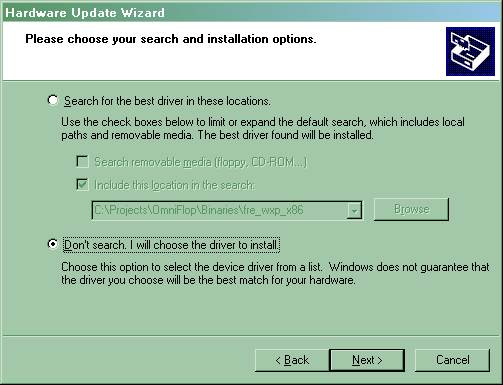
Figure 17. Hardware Update Wizard – Search Options
Select ‘Don't search. I will choose the driver to install’, and click ‘Next’.
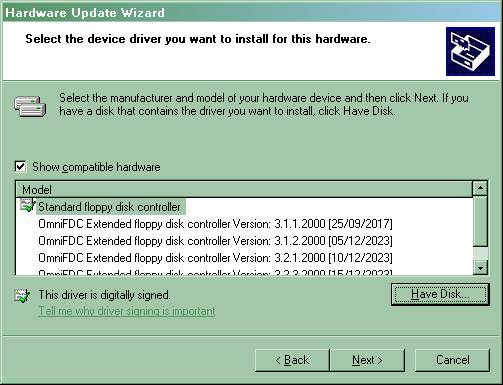
Figure 18. Hardware Update Wizard – Initial Options
Regardless of the suggested driver, click ‘Have Disk’ and ‘Browse’ to where OmniFlop has been installed.

Figure 19. WinXP: Browse for Driver
OK the selection and click 'Next' in the Hardware Update Wizard. The driver should install.

Figure 20. WinXP: Controller Installed
Click 'Finish' and return to the new properties:

Figure 21. WinXP: Controller Installed
Click 'Close' and return to Device Manager.
Repeat for each Floppy disk drive in your system the following sequence:
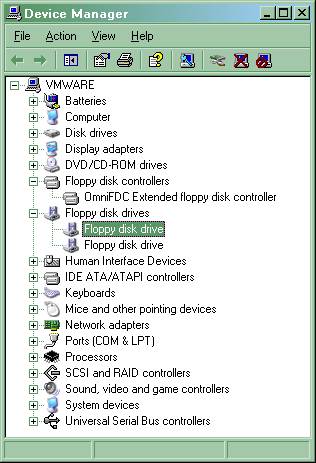
Figure 22. WinXP: Device Manager
Right-click each 'Floppy disk drive' in sequence and select 'Properties'.

Figure 23. WinXP: Floppy Disk Drive Properties
Select the 'Driver' tab along the top of the window.

Figure 24. WinXP: Floppy Disk Drive Driver
Click 'Update Driver'.. The Hardware Update Wizard starts, and may produce as a first screen:
Figure 25. WinXP: Windows Update
Select 'No, not this time' and click 'Next'.

Figure 26. WinXP: Hardware Update Wizard – Auto/Manual
Select ‘Install from a specific location’, and click ‘Next’.
Figure 27. Hardware Update Wizard – Search Options
Select ‘Don't search. I will choose the driver to install’, and click ‘Next’.

Figure 28. Hardware Update Wizard – Initial Options
Regardless of the suggested driver, click ‘Have Disk’ and ‘Browse’ to where OmniFlop has been installed.
Figure 29. WinXP: Browse for Driver
OK the selection and click 'Next' in the Hardware Update Wizard. The driver should install.
You may get a warning:

Figure 30. WinXP: No Digital Signature
If you get this warning, click 'Continue Anyway'.

Figure 31. WinXP: Drive Installed
Click 'Finish' and return to the new properties:

Figure 32. WinXP: Drive Installed
Click 'Close' and return to Device Manager, which should now look like this:

Figure 33. WinXP: Installation Complete
The driver is now installed. Run the OmniFlop application and 'Test Installation' to see if this has worked.
2.3.1.3 Windows Vista
The installation follows a similar path to XP. The following screen shots are provided for guidance.


Choose 'Browse...'.

Choose 'Have Disk...'.


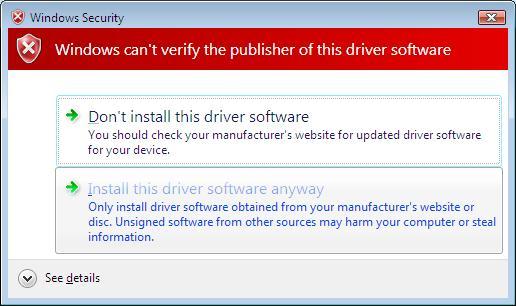
Repeat the above sequence for the Floppy Disk Drive:


Run the OmniFlop application and 'Test Installation' to see if this has worked.
2.3.1.4 Windows 7x86 (32-bit)
The installation follows a similar path to XP and Vista. The following screen shots are provided for guidance.
If you have a previous version of OmniFlop installed follow the removal instructions in 2.4.1.4 Windows 7 (32-bit or 64-bit) before following this section.
Open Device Manager (click the Start button then type 'Device Manager' and select it from the Control Panel). You should have a 'Floppy Disk Drive' and a 'Floppy Disk Controller' listed:

Figure 34. Win7: Floppy Disk Controller
Right-click the 'Standard floppy disk controller' and select 'Properties'.
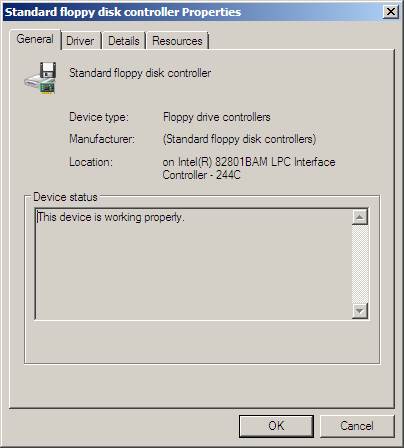
Figure 35. Win7: Floppy Disk Controller Properties
Select the 'Driver' tab along the top of the window.

Figure 36. Win7: Floppy Disk Controller Driver
Click 'Update Driver'.

Figure 37. Win7: Floppy Disk Controller Search
Click 'Browse my computer for driver software'.

Figure 38. Win7: Floppy Disk Controller Search
Click 'Let me pick from a list of device drivers'.

Figure 39. Win7: Floppy Disk Controller Driver Options
Ignore the options suggested. Click 'Have Disk...'.

Figure 40. Win7: Floppy Disk Controller Browse
Browse to the folder where you extracted OmniFlop and click 'OK'.

Figure 41. Win7: Floppy Disk Controller OmniFDC Driver
With 'OmniFDC' selected, click 'Next'.
At the prompt 'The publisher cannot be verified' click 'Install this driver software anyway'.

Figure 42. Win7: Signature Enforcement
Once the driver has been installed you will be prompted with:

Figure 43. Win7: Floppy Disk Controller Updated
Click 'Close' and return to the new properties:

Figure 44. Win7: Floppy Disk Controller Properties
Click 'Close' and return to Device Manager.
Repeat for each Floppy disk drive in your system the following sequence:

Figure 45. Win7: Floppy Disk Drive
Right-click the 'Floppy disk drive' and select 'Properties'.

Figure 46. Win7: Floppy Disk Drive Properties
Select the 'Driver' tab along the top of the window.

Figure 47. Win7: Floppy Disk Drive Driver
Click 'Update Driver'.

Figure 48. Win7: Floppy Disk Drive Search
Click 'Browse my computer for driver software'.

Figure 49. Win7: Floppy Disk Drive Search
Click 'Let me pick from a list of device drivers'.

Figure 50. Win7: Floppy Disk Drive Options
Ignore any suggestions. Click 'Have Disk...'.

Figure 51. Win7: Floppy Disk Drive Browse
Browse to the folder where you extracted OmniFlop and click 'OK'.

Figure 52. Win7: Floppy Disk Drive OmniFlop
With 'OmniFlop Enhanced Floppy Disk Drive' selected, click 'Next'.
At the prompt 'The publisher cannot be verified' click 'Install this driver software anyway'.
Figure 53. Win7: Signature Enforcement
Once the driver has been installed you will be prompted with:

Figure 54. Win7: Floppy Disk Drive Installed
Click 'Close' and return to the new properties:

Figure 55. Win7: Floppy Disk Drive Properties
Click 'OK' and return to Device Manager.
Upgrade all drives. You may need to reboot - on a 64-bit system make sure you disable driver signature enforcement again if you reboot.
After you have upgraded all drives, Device Manager should now look like this:

Figure 56. Win7: Installation Complete
The driver is now installed. Now run the OmniFlop application and 'Test Installation' to see if this has worked.
2.3.1.5 Windows 7x64 (64-bit)
For 64-bit Windows 7 you must 'disable driver signature enforcement' to use the OmniFlop drivers.
You
must do this whenever you want to access the floppy disk or use OmniFlop.
- From the 'Start' menu, select 'Restart' and hold down function key F8.

Figure 57. Win7: Restart - Press and hold F8 and Click 'OK'
- Keep holding F8 down while the PC
reboots.
- At the 'Advanced Boot Options' screen, select 'Disable Driver Enforcement'and press ENTER:
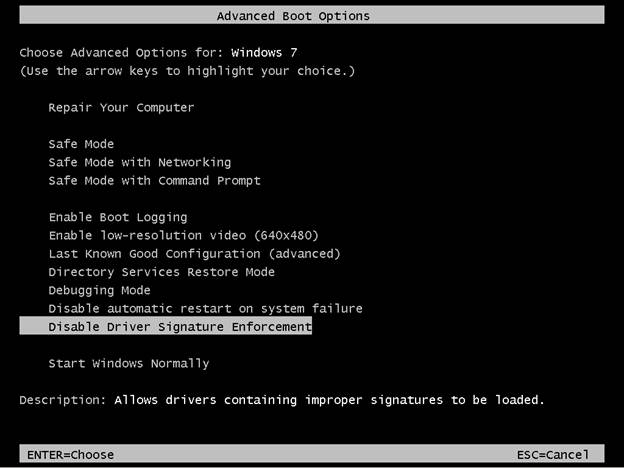
Figure 58. Win7: Advanced Boot Options
- Follow 2.3.1.4 Windows 7x86 (32-bit) to install the drivers, or just use the system if you have previously installed the drivers.
Whenever you want to use the floppy drive or OmniFlop, you must repeat the above F8 sequence. Re-installing the driver is not usually required, but 'Disable Driver Signature Enforcement' is.
2.3.1.6 Windows 8 (32-bit or 64-bit)
This follows a similar pattern to Windows 7 and Windows 10.
If you have a previous version of OmniFlop installed follow the removal instructions in 2.4.1.5 Windows 8 before following this section.
For 64-bit Windows 8 you must 'disable driver signature enforcement' to use the OmniFlop drivers.
- Make sure you are ready to reboot! Save all documents and close all windows.
- Press win + I to launch the charm bar.
- Select 'Change PC Settings' at the bottom.
- Select General, and scroll to the bottom of the page, click Restart Now button under Advanced Startup section (on Windows 8.1, the Advanced Startup option is now 'Update and recovery' under Recovery). The system will reboot.
- On rebooting, you will be offered another menu.
- Select 'Troubleshoot'.
- Select 'Advanced options'.
- Select 'Startup settings'.
- Select 'Restart'
- The system will reboot again to a menu 'Startup settings'.
- Press 7 or F7 to select 'Disable driver signature enforcement'.
- System will boot. Install drivers as above. You will get a Windows Security warning window allowing you to install the drivers anyway.
2.3.1.7 Windows 10 (32-bit)
If you have a previous version of OmniFlop installed follow the removal instructions in 2.4.1.6 Windows 10 (32-bit or 64-bit) before following this section.
Open Device Manager (click the Start button then type 'Device Manager' and select it from the Control Panel). You should have a 'Floppy Disk Drive' and a 'Floppy Disk Controller' listed:

Figure 59. Win10: Floppy Disk Controller
Right-click the 'Standard floppy disk controller' and select 'Properties'.
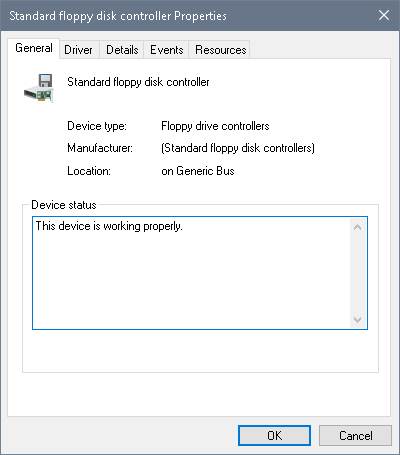
Figure 60. Win10: Floppy Disk Controller Properties
Select the 'Driver' tab along the top of the window.
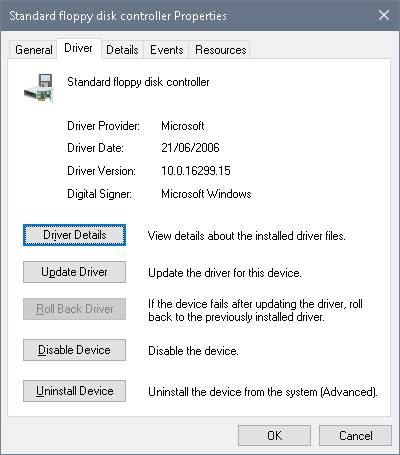
Figure 61. Win10: Floppy Disk Controller Driver
Click 'Update Driver'.

Figure 62. Win10: Floppy Disk Controller Search
Click 'Browse my computer for driver software'.
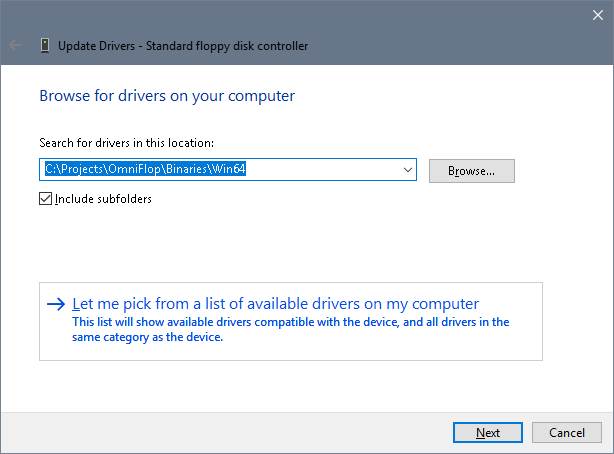
Figure 63. Win10: Floppy Disk Controller Search
Click 'Let me pick from a list of device drivers'.

Figure 64. Win10: Floppy Disk Controller Driver Options
Ignore the options suggested. Click 'Have Disk...'.
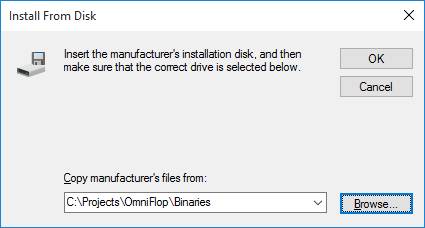
Figure 65. Win10: Floppy Disk Controller Browse
Browse to the folder where you extracted OmniFlop and click 'OK'.

Figure 66. Win10: Floppy Disk Controller OmniFDC Driver
With 'OmniFDC' selected, click 'Next'.
At the prompt 'The publisher cannot be verified' click 'Install this driver software anyway'.
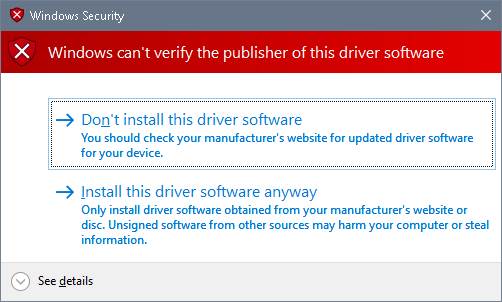
Figure 67. Win10: Signature Enforcement
Once the driver has been installed you will be prompted with:

Figure 68. Win10: Floppy Disk Controller Updated
Click 'Close' and return to the new properties:

Figure 69. Win10: Floppy Disk Controller Properties
Click 'Close' and return to Device Manager.
Repeat for each Floppy disk drive in your system the following sequence:

Figure 70. Win10: Floppy Disk Drive
Right-click the 'Floppy disk drive' and select 'Properties'.

Figure 71. Win10: Floppy Disk Drive Properties
Select the 'Driver' tab along the top of the window.

Figure 72. Win10: Floppy Disk Drive Driver
Click 'Update Driver'.

Figure 73. Win10: Floppy Disk Drive Search
Click 'Browse my computer for driver software'.
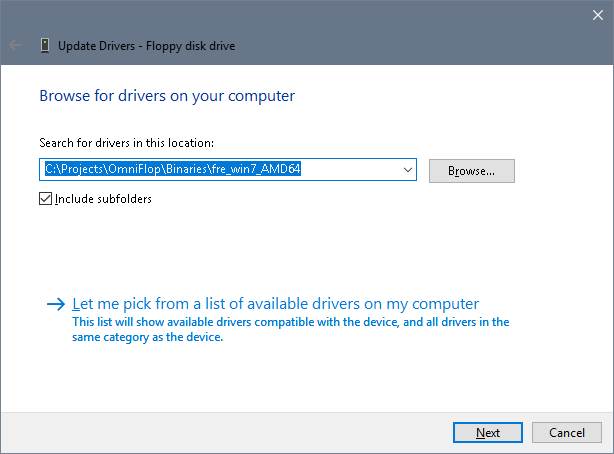
Figure 74. Win10: Floppy Disk Drive Search
Click 'Let me pick from a list of device drivers'.

Figure 75. Win10: Floppy Disk Drive Options
Ignore any suggestions. Click 'Have Disk...'.

Figure 76. Win10: Floppy Disk Drive Browse
Browse to the folder where you extracted OmniFlop and click 'OK'.

Figure 77. Win10: Floppy Disk Drive OmniFlop
With 'OmniFlop Enhanced Floppy Disk Drive' selected, click 'Next'.
At the prompt 'The publisher cannot be verified' click 'Install this driver software anyway'.

Figure 78. Win10: Signature Enforcement
Once the driver has been installed you will be prompted with:

Figure 79. Win10: Floppy Disk Drive Installed
Click 'Close' and return to the new properties:

Figure 80. Win10: Floppy Disk Drive Properties
Click 'OK' and return to Device Manager.
Upgrade all drives. You may need to reboot - on a 64-bit system make sure you disable driver signature enforcement again if you reboot.
After you have upgraded all drives, Device Manager should now look like this:

Figure 81. Win10: Installation Complete
The driver is now installed. Now run the OmniFlop application and 'Test Installation' to see if this has worked.
2.3.1.8 Windows 10 (64-bit)
If you have a previous version of OmniFlop installed follow the removal instructions in 2.4.1.6 Windows 10 (32-bit or 64-bit) before following this section.
For 64-bit Windows 10 you must 'disable driver signature enforcement' to use the OmniFlop drivers.
- Make sure you are ready to reboot! Save all documents and close all windows.
- Press the Windows key to launch the Start Menu.

- Click on the Power icon, hold down the SHIFT key, and choose 'Restart'.

- The system will shut down, and present you with a menu:

- Select 'Troubleshoot'.
- Select 'Advanced options'.
- Select 'Startup settings'.
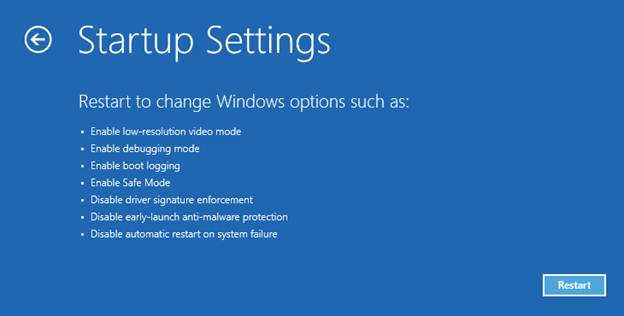
- Select 'Restart'.
- The system will reboot again to a menu 'Startup settings'.

- Press 7 or F7 to select 'Disable
driver signature enforcement'.
- The system will boot.
- Follow 2.3.1.7 Windows 10 (32-bit) to install the drivers, or just use the system if you have previously installed the drivers.
2.3.1.9 Windows 11 (64-bit)
If you have a previous version of OmniFlop installed follow the removal instructions in 2.4.1.7 Windows 11 (64-bit) before following this section.
For 64-bit Windows 11 you must 'disable driver signature enforcement' to use the OmniFlop drivers.
Windows 11 supports both the Windows 7 (see 2.3.1.5 Windows 7x64 (64-bit)) and Windows 10 methods (see 2.3.1.8 Windows 10 (64-bit)) for disabling driver signature enforcement.
If you haven't booted Windows yet, follow the 'F8' part of 2.3.1.5 Windows 7x64 (64-bit) then once the system is booted use 2.3.1.7 Windows 10 (32-bit) to install the drivers.
If you have booted Windows already, follow the instructions in 2.3.1.8 Windows 10 (64-bit) for a 64-bit Windows 10 installation.
2.3.2 Application
The application (OmniFlop.exe, a wizard) may be run directly by double-clicking the program icon. No other installation is required.
Under Windows 7, 8 and 10 you may be prompted (by "User Account Control") to allow the application to make changes to your system - this is required for OmniFlop to have direct access to the floppy disk drive. No other access is required, or used, by OmniFlop.
2.4 Removal
2.4.1 Driver
2.4.1.1 Windows 2000
Follow the actions in section 2.3.1.1 up to Figure 6. There should be two driver options currently available to choose from: "Floppy disk drive" and "OmniFlop Enhanced Floppy Disk Drive". Choose "Floppy disk drive" , click 'Next', and continue from Figure 8.
2.4.1.2 Windows XP
Open Device Manager (Start >> Settings >> Control Panel >> System >> Hardware >> Device Manager).

For every 'Floppy disk drive', double-click the 'Floppy disk drive'.
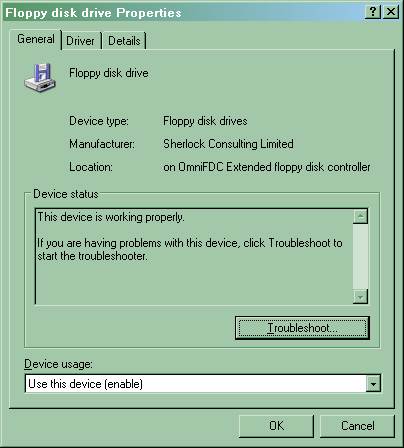
Select the 'Driver' tab.
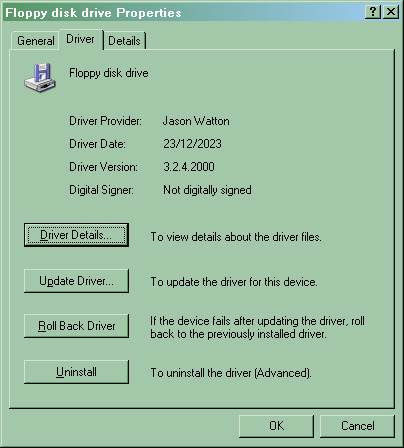
Click 'Uninstall':

Click 'OK'.
Repeat this
for all 'Floppy disk drives' in your system until there are no 'Floppy disk
drives' left:

Double-click
the 'Floppy disk controller':

Click the
'Driver' tab:

Click 'Uninstall':
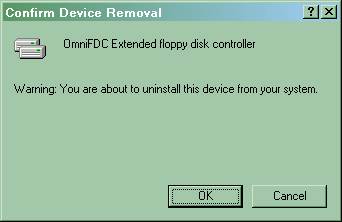
Click 'OK'.
Repeat this
for all 'Floppy disk controllers' in your system until there are no 'Floppy
disk controllers' left:

From the 'Action' menu (or the toolbar), select 'Scan for hardware changes'. The 'Floppy disk controller' and all installed 'Floppy disk drives' should reappear:

Your system has been restored to (Microsoft) standard floppy disk drivers.
2.4.1.3 Windows Vista
After 'Browse my computer for driver software' choose the offered 'Standard floppy disk controller' or 'Floppy disk drive' driver.
2.4.1.4 Windows 7 (32-bit or 64-bit)
Open Device Manager (Start >> Device Manager).
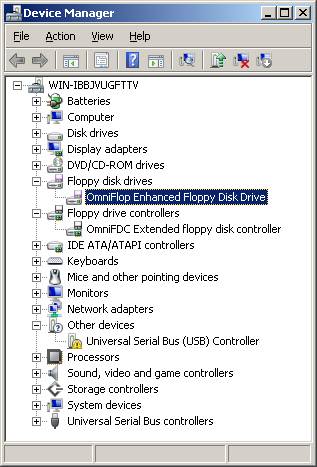
For each 'Floppy disk drive' in sequence, double-click the 'Disk Drive'.

Select the 'Driver' tab.

Click 'Uninstall':
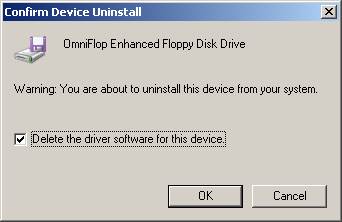
If this is the last disk drive installed, enable
'Delete the driver software for this device', and click 'OK'.
Repeat this
for all 'Floppy disk drives' in your system until there are no 'Floppy disk
drives' left:

Double-click
the 'Floppy disk controller':

Click the
'Driver' tab:

Click 'Uninstall':
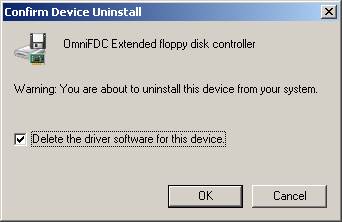
If this is the last disk controller installed, enable
'Delete the driver software for this device', and click 'OK'.
Repeat this
for all 'Floppy disk controllers' in your system until there are no 'Floppy
disk controllers' left:
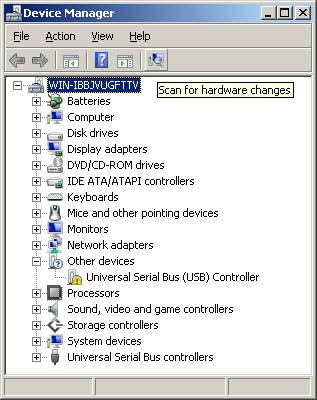
From the 'Action' menu (or the toolbar), select 'Scan for hardware changes'. The 'Floppy disk controller' and all installed 'Floppy disk drives' should reappear:

Your system has been restored to (Microsoft) standard floppy disk drivers.
2.4.1.5 Windows 8 (32-bit or 64-bit)
Follow Windows 7 (32-bit or 64-bit).
2.4.1.6 Windows 10 (32-bit or 64-bit)
Follow Windows 7 (32-bit or 64-bit).
2.4.1.7 Windows 11 (64-bit)
Follow Windows 7 (32-bit or 64-bit).
2.4.2 Application
Simply delete the folder containing the executable file. No further removal is required.
2.5 Registration and Licensing
Certain formats and functions of OmniFlop require you to get a license from the author. Since v2.2b almost all licensing has been removed.
Licenses
are free and do not require any enrolment or subscriptions.
Any
information supplied for registration will only be used for registration and to
aid in the support and development of the product.
Licenses can be obtained using e-mail (click 'Register by e-mail') or, preferably, on-line (click 'Register on-line'). Registering on-line is automated and fast, whereas e-mails have to be manually processed, so are considerably slower.
If there are problems obtaining a license, check http://www.shlock.co.uk/Utils/OmniFlop for details of service. There are times when licensing is unavailable, especially using e-mail.
2.5.1 Justification
The decision to enforce licences was taken for the following reasons:
- When OmniFlop is downloaded from the Internet, for free, it either works, or does not.
- If it works, there is no feedback. I am not told that formats work.
- If it does not work, people usually give up. I am not told that it has not worked.
Free unrestrained distribution has provided no feedback on the number of users, what it was being used for, how successful it was, or how unsuccessful it was. The only feedback has been via those requiring support in using it who decide to contact me. Feedback is essential for almost all formats, and licensing provides this.
2.5.2 Licensing Strategy
Licensing is applied as follows:
- Testing Disks requires no licence.
- Licenses are available to allow use of the OmniFlop driver with external (3rd party) programs. The licensing is used to monitor the support liability for external programs.
The right to refuse licences is reserved.
2.5.3 Getting a License
Using the program does not normally require a license. If you need a license, you will be told. To get a license you should simply attempt the function you wish to use.
However, there are situations where you want to obtain a license up-front, i.e. before attempting the function. This includes licensing other software to use the OmniFlop driver - a license is used to enable other software to access the driver directly. To get a license in this case use the 'Get a License' option from the front screen. The program will prompt with instructions, but when you ask for the license you must specify:
- The program name, i.e. OmniFlop
- The version number, e.g. v3.1a
- The Registration Code, e.g. BBCgT51x£@3. This is unique to you and a license cannot be issued without it. The code may contain codes which are normally untypeable or characters that you cannot easily recognise - e.g. 'I' and 'l', '0' and 'O' - so you should cut & paste the code directly into an e-mail. From v2.01 onwards an e-mail will automatically be generated for this purpose.
- The format you are trying to use. This is point of the license.
- The hardware you are using (i.e. machine type or motherboard). This is to help with support and highlight PCs which are known to work, or known not to.
If you require multiple licences it saves time and effort if you note down all the details for those you require before asking for the licences.
3. User Guide
This section describes use of the OmniFlop Wizard.
3.1 Supported Formats & Discoverers
The OmniFlop driver recognises formats in two different ways:
- From a list of pre-defined 'known' formats. These can be physically read, written, and formatted.
- By physically analysing a pre-formatted floppy disk. This results in an 'unknown' format which can still be read or written. This means OmniFlop can read and write formats even if it doesn't know them.
The driver must be installed to read, write, and format extended and unknown formats. If an analysis finds a format on a disk which is already known then OmniFlop switches to using the parameters of that format.
The formats known to be recognised by OmniFlop are currently (with discoverers):
|
OmniFlop
driver required? |
EXTENDED_MEDIA_TYPE |
Format Name |
Discoverer |
|
NO |
F8_256_128 |
8"
DOS 256kB |
|
|
NO |
F5_160_512 FX_IBM_DOS160 |
5¼"
DOS 160kB |
|
|
NO |
F5_180_512 FX_IBM_DOS180 |
5¼"
DOS 180kB |
|
|
NO |
F5_320_512 FX_IBM_DOS320 |
5¼"
DOS 320kB |
|
|
NO |
F5_320_1024 |
5¼"
DOS 320kB (1024-byte sectors) |
|
|
NO |
F5_360_512 FX_IBM_DOS360 |
5¼"
DOS 360kB |
|
|
YES |
F5_640_512 FX_IBM_DOS640 |
5¼"
DOS 640kB |
Malcolm
Sargent |
|
NO |
F5_720_512 FX_IBM_DOS720 |
5¼"
DOS 720kB |
|
|
NO |
F5_1Pt2_512 FX_IBM_DOS1200 |
5¼"
DOS 1.2MB |
|
|
NO |
F5_1Pt23_1024 FX_IBM_DOS320_1024 |
5¼"
DOS 1.23MB (1024-byte sectors) |
|
|
YES |
FX_IBM_DOS160 |
3½"
DOS 160kB |
|
|
YES |
FX_IBM_DOS180 |
3½"
DOS 180kB |
|
|
YES |
FX_IBM_DOS320 |
3½"
DOS 320kB |
|
|
YES |
FX_IBM_DOS320_1024 |
3½"
DOS 320kB (1024-byte sectors) |
|
|
YES |
FX_IBM_DOS360 |
3½"
DOS 360kB |
|
|
YES |
F3_640_512 FX_IBM_DOS640 |
3½"
DOS 640kB |
Malcolm
Sargent |
|
NO |
F3_720_512 FX_IBM_DOS720 |
3½"
DOS 720kB |
|
|
NO |
F3_1Pt2_512 FX_IBM_DOS1200 |
3½"
DOS 1.2MB |
|
|
NO |
F3_1Pt23_1024 |
3½"
DOS 1.23MB (1024-byte sectors) |
|
|
NO |
F3_1Pt44_512 FX_IBM_DOS1440 |
3½"
DOS 1.44MB |
|
|
NO |
F3_2Pt88_512 FX_IBM_DOS2880 |
3½"
DOS 2.88MB |
|
|
NO |
F3_20Pt8_512 |
3½"
DOS 20.8MB |
|
|
NO |
F3_120M_512 |
3½"
DOS 120MB |
|
|
NO |
F3_128Mb_512 |
3½"
DOS 128MB |
|
|
NO |
F3_230Mb_512 |
3½"
DOS 230MB |
|
|
YES |
FX_IBM_DOS729 |
DOS
729kB |
Gutbrod
András |
|
YES |
FX_IBM_DOS800 |
DOS
800kB |
|
|
YES |
FX_IBM_DOS1215 |
DOS
1.215MB |
Vitaliy
Vorobyov |
|
YES |
FX_IBM_DOS1232 |
DOS
1.232MB |
pstaszkow |
|
YES |
FX_IBM_DOS1230 |
DOS
1.230MB |
Vitaliy
Vorobyov |
|
YES |
FX_IBM_DOS1245 |
DOS
1.245MB |
Vitaliy
Vorobyov |
|
YES |
FX_IBM_DOS1458 |
DOS
1.458MB |
Vitaliy
Vorobyov |
|
YES |
FX_IBM_DOS1476 |
DOS
1.476MB |
Vitaliy
Vorobyov |
|
YES |
FX_IBM_DOS1494 |
DOS
1.494MB |
Vitaliy
Vorobyov |
|
YES |
FX_IBM_DOS1701 |
DOS
1.701MB |
Lindsay
Hargreaves |
|
YES |
FX_IBM_DOS1722 |
DOS
1.722MB |
Stephane
Roth |
|
YES |
FX_IBM_DOS1743 |
DOS
1.743MB |
kalman |
|
YES |
FX_4THDIM_800 |
4th
Dimension 799.75kB |
Wocki |
|
YES |
FX_ABB_IRB2000 |
ABB/Asea
Robot IRB2000 S3 Type: PS 130/6 -45-P. 3084 80-track |
Rob
Bos |
|
YES |
FX_ABB_ROBOT |
ABB/Asea
Robot |
Daniel
C Hayden |
|
YES |
FX_ABB_ROBOT41 |
ABB/Asea
Robot IRB L6/0293 41-track |
Toon
Lettink |
|
YES |
F3_ABB_ROBOT41 |
ABB/Asea
Robot IRB L6/0293 3½" conversion |
Leotta
Domenico |
|
YES |
FX_IBM_DOS360 |
3½"
Acorn BBC Master 512 DOS 360kB |
Chris
Richardson |
|
NO |
F3_720_512 |
3½" Acorn BBC Master 512 DOS 720kB |
Chris Richardson |
|
NO |
F5_720_512 |
5¼" Acorn BBC Master 512 DOS 720kB |
Chris Richardson |
|
YES |
F3_BBC_ADFS_L |
3½"
Acorn ADFS L 640kB |
Chris
Richardson |
|
YES |
F5_BBC_ADFS_L |
5¼"
Acorn ADFS L 640kB |
Tim
Felgate, Jon Ripley, Mark Ferns |
|
YES |
FX_BBC_ADFS_M |
Acorn
ADFS M 320kB |
Jonathan
G Harston, Chris Richardson |
|
YES |
FX_BBC_ADFS_S |
Acorn
ADFS S 160kB |
Jonathan
G Harston, Chris Richardson |
|
YES |
FX_BBC_ADFS_DE |
Acorn
ADFS D, D+, E, E+ 800kB |
Jon
Ripley, Chris Richardson |
|
YES |
FX_BBC_ADFS_F |
Acorn
ADFS F, F+ 1600kB |
Jon
Ripley, Chris Richardson |
|
YES |
FX_BBC_SJ_MDFS |
Acorn
BBC SJ Research MDFS |
Mark
Ferns |
|
YES |
FX_BBC_DFS40 |
Acorn
BBC DFS 40-track single-sided (100kB) |
Chris
Richardson, Rob Nicholds |
|
YES |
FX_BBC_DFS40x2 |
Acorn
BBC DFS 40-track double-sided (200kB) |
Chris
Richardson |
|
YES |
FX_BBC_DFS80 |
Acorn
BBC DFS 80-track single-sided (200kB) |
Chris
Richardson, Rob Nicholds |
|
YES |
FX_BBC_DFS80x2 |
Acorn
BBC DFS 80-track double-sided (400kB) |
Chris
Richardson |
|
YES |
FX_BBC_DFS415 |
Acorn
BBC DFS 83-track double-sided (415kB) |
Electronic
Workshop, University of Sheffield |
|
YES |
FX_BBC_Z80_CPM |
Acorn
BBC Z80 CP/M 400kB |
Chris
Richardson |
|
YES |
F5_BBC_MAST_DOS_40T FX_BBC_MAST_DOS_40T |
Acorn
BBC Master 512 DOS 360kB |
Chris
Richardson |
|
NO |
F3_BBC_MAST_DOS |
3½"
Acorn BBC Master 512 DOS Plus 720kB |
Chris
Richardson |
|
NO |
F5_BBC_MAST_DOS |
5¼"
Acorn BBC Master 512 DOS Plus 720kB |
Chris
Richardson |
|
YES |
FX_BBC_DOS_PLUS |
Acorn
BBC Master 512 DOS Plus 800kB |
Chris
Richardson |
|
YES |
FX_BBC_DDOS80 |
Acorn
BBC DDOS 80-track single-sided 360kB |
Jason
Watton |
|
YES |
FX_BBC_DDOS80x2 |
Acorn
BBC DDOS 80-track double-sided 720kB |
Jason
Watton |
|
YES |
FX_AKAI_MPC_60 |
AKAI
MPC 60 MK II |
Dale
Henriques |
|
YES |
FX_AKAI_S900 |
AKAI
S-900 800kB |
Markus
Dimdal |
|
YES |
FX_AKAI_S950_HD |
AKAI
S-900 1440kB |
Markus
Dimdal |
|
YES |
FX_AKAI_S_DD |
AKAI
S-950 800kB |
Markus
Dimdal |
|
YES |
FX_AKAI_S950_HD |
AKAI
S-950 1440kB |
Markus
Dimdal |
|
YES |
FX_AKAI_S_HD |
AKAI
S-950 1600kB |
Markus
Dimdal |
|
YES |
FX_AKAI_S1000_DD |
Akai
S-1000 800kB |
Markus
Dimdal |
|
YES |
FX_AKAI_S1000_HD |
Akai
S-1000 1600kB |
Markus
Dimdal |
|
YES |
FX_AKAI_S3000_DD |
Akai
S-3000 800kB |
Markus
Dimdal |
|
YES |
FX_AKAI_S3000_HD |
Akai
S-3000 1600kB |
Markus
Dimdal |
|
YES |
FX_ALESIS_DATA |
Alesis
Datadisk (800kB) |
Donal
Ryan |
|
YES |
FX_APPL1616_800 |
Applix
1616 (800kB) |
Bob
Devries |
|
YES |
FX_APPL1616_810 |
Applix
1616 (810kB) |
Bob
Devries |
|
YES |
FX_APPL1616_820 |
Applix
1616 (820kB) |
Bob
Devries |
|
YES |
FX_AMS_DATA_SS FX_AMS_DATA_DS |
Amstrad
Data (SS/DS) |
Karl Kopeszki |
|
NO |
F5_AMS_IBM FX_AMS_IBM |
5¼"
Amstrad IBM 160kB |
|
|
NO |
F5_AMS_CPM |
5¼"
Amstrad CP/M 720kB |
Andy J Davis, Thomas Heck |
|
NO |
F3_AMS_CPM |
3½"
Amstrad CP/M 720kB |
Andy J Davis, Thomas Heck |
|
YES |
FX_AMS_SYS_SS FX_AMS_SYS_DS |
Amstrad
System (SS/DS) |
Karl Kopeszki |
|
YES |
FX_AMS_SYS_DATA FX_AMS_DATA_SYS |
Amstrad
System/Data DS and Data/System DS |
Karl Kopeszki |
|
NO |
FX_APPLE_MAC_HD_HFS |
3½"
Apple Macintosh 1.44MB high-density, HFS Volume |
Jon
Ripley |
|
YES |
FX_ASM_2000_1440 |
ASM
Epsilon 2000 Epi Reaktor |
Christof
Kauer, ipcas GmbH |
|
YES |
FX_ATRI_8BIT_90 |
Atari
8-bit 90kB |
Charles
Doty |
|
NO |
F5_ATRIST_DSDD |
5¼"
Atari ST DSDD 720kB |
Jon
Ripley |
|
NO |
F3_ATRIST_DSDD |
3½"
Atari ST DSDD 720kB |
Jon
Ripley |
|
YES |
FX_ATRIST_320 |
Atari
ST SS 320kB |
Bob
Devries |
|
YES |
FX_ATRIST_SSDD |
Atari
ST SS 360kB |
Mark
"alfspanners" |
|
YES |
FX_ATRISTE_738 |
Atari
|
John
Davis |
|
YES |
FX_ATRISTE_800 |
Atari
|
John
Davis |
|
YES |
FX_ATRISTE_810 |
Atari
|
John
Davis |
|
YES |
FX_ATRISTE_820 |
|
David
Williams |
|
YES |
FX_ATRI_PUP |
Atari
ST(e) Power Up Plus 913kB - Note: Writing disks of this format may require retries - keep
pressing 'Retry'! |
Norman
Bruggner |
|
YES |
FX_AUTOMX_RAIL |
Automatix
RobotControl RAIL 400kB |
Johan
M Lundstrom |
|
YES |
FX_AUTOMX_RAIL_0 |
Media400x1024_0
400kB |
Taking
the 5th! |
|
YES |
FX_BALZER |
Balzer
Metal Evaporator Balzer
Ophthalmic Lens Machine |
Richard
Scott Carlos
Sánchez |
|
YES |
FX_BELI |
Beli
640kB |
Igor
Živanović |
|
YES |
FX_BMI3030A |
BMI3030A |
Edward
Winterberger |
|
YES |
FX_CASIO_FZ20M |
Casio
FZ-20M Note: This format may require a modification
to your PC floppy drive for use with the Casio FZ-20M - see here. |
Dr.
Georg Müller, Chris Strellis |
|
YES |
FX_CASIO_FZ20M_HD |
Casio
FZ-20M HD |
Rainer
Buchty |
|
YES |
FX_CBM1581 |
cbm1581 |
Wolfgang
Moser |
|
YES |
FX_CMDFD1M |
cmdfd1m |
Wolfgang
Moser |
|
YES |
FX_CMDFD2M |
cmdfd2m |
Wolfgang
Moser |
|
YES |
FX_CMDFD4M |
cmdfd4m |
Wolfgang
Moser |
|
NO |
FX_CNI_NC481_HD |
CNI NC481 HD 1440kB |
Senad
Gluhacevic |
|
NO |
F5_CNI_NC481_DD |
5¼" CNI NC481 DD 720kB |
Kamil Murin |
|
NO |
F3_CNI_NC481_DD |
3½" CNI NC481 DD 720kB |
Kamil Murin |
|
YES |
FX_ROTROL_720 |
Cloos
Rotrol 16 720kB |
Christof
Kauer |
|
YES |
FX_COMP_AUTO_LSI2 |
Computer
Automation LSI-2 Mini |
Lars
Hamren |
|
YES |
FX_COMX_35_SS |
COMX
DOS 35-track single sided |
Dennis
Heijmans |
|
YES |
FX_COMX_35_DS |
COMX
DOS 35-track double sided |
Dennis
Heijmans |
|
YES |
FX_COMX_70_SS |
COMX
DOS 70-track single sided |
Marcel
van Tongeren |
|
YES |
FX_CPM_640 |
CP/M-80
640kB (various machines, e.g. P2000C) |
Jason
Watton |
|
YES |
FX_CPM22_CTS_800 |
CP/M
2.2 80/10x1024 800kB |
Dave
Timmins |
|
YES |
FX_DG1_200 |
Data
General/1 |
Josef
Havlik |
|
YES |
FX_DEC_RAINBOW |
DEC
Rainbow 100 |
Paul
Hughes |
|
YES |
FX_DEC_RX02_1001 |
DEC
RX02 1001kB |
Nikolay
Degtev |
|
NO |
F3_720_512 F5_720_512 |
Data
I/O UniSite 720kB |
Jonathan
Levine |
|
NO |
F3_1Pt44_512 FX_IBM_DOS1440 |
Data
I/O UniSite 1440kB |
Jonathan
Levine |
|
YES |
F3_DIDAKTIK_D40 |
Didaktik
D40 3.5" 360kB |
Pavel
Chromy |
|
YES |
F5_DIDAKTIK_D40 |
Didaktik
D40 5.25" 360kB |
Pavel
Chromy |
|
YES |
F3_DIDAKTIK_D80 |
Didaktik
D80 3.5" 720kB |
Pavel
Chromy |
|
YES |
F5_DIDAKTIK_D80 |
Didaktik
D80 5.25" 720kB |
Pavel
Chromy |
|
YES |
FX_DYNACORD |
Dynacord |
Garth
Hjelte |
|
YES |
FX_DYNACORD_ADD1 |
Dynacord
ADD-one |
Roland
Weihmayer |
|
YES |
FX_ELG_WP_CPM |
Electroglas
Wafer Probers CP/M |
Phil
Wiens |
|
YES |
FX_EMU_EIII_DD |
E-mu EIII DD-disk 800kB |
Alexander
Burgwedel |
|
YES |
FX_EMU_EIII_HD |
E-mu EIII HD-disk 800kB |
Alexander
Burgwedel |
|
YES |
FX_EMU_EMAX_DOS FX_EMU_EMAX |
E-mu Emax 800kB |
Garth Hjelte |
|
NO |
FX_EMU_EOS |
E-mu EOS 1440kB |
Garth Hjelte |
|
NO |
FX_EMU_ESI |
E-mu ESi 1440kB |
Garth Hjelte |
|
NO |
F5_720_512 |
5¼"
Ensoniq ASR-10 Computer Format DD |
Markus
Dimdal |
|
NO |
F3_720_512 |
3½"
Ensoniq ASR-10 Computer Format DD |
Markus
Dimdal |
|
NO |
F3_ENS_720 F5_ENS_720 |
Ensoniq
ASR-10, EPS, KS32, KT, SQ1, SQ2, SQ80, VFX-SD 720kB |
Markus
Dimdal |
|
YES |
FX_ENS_800 |
Ensoniq
ASR-10, EPS, EPS 16+, KS32, KT, SQ1, SQ2, SQ80, VFX-SD, SD-1 800kB |
Markus
Dimdal |
|
YES |
FX_ENS_820 |
Ensoniq
ASR-10, EPS, KS32, KT, SQ1, SQ2, SQ80, VFX-SD 820kB |
Markus
Dimdal |
|
YES |
FX_ENS_1600 |
Ensoniq
ASR-10, EPS, KS32, KT, SQ1, SQ2, SQ80, VFX-SD 1600kB |
Markus
Dimdal |
|
YES |
FX_ENS_1640 |
Ensoniq
ASR-10, EPS, KS32, KT, SQ1, SQ2, SQ80, VFX-SD 1640kB |
Markus
Dimdal |
|
NO |
FX_ENS_COMP_1440 |
3½"
Ensoniq ASR-10 Computer Format HD 1.44MB |
Markus
Dimdal |
|
YES |
FX_ENS_COMP_800 |
Ensoniq
EPS 16+/Classic DD Ensoniq
ASR-10 [Computer Format] DD Ensoniq
VFX-SD Ensoniq
SD-1 |
Matt
Savard, Markus Dimdal, H Mandingo Gary
Giebler Gary
Giebler |
|
YES |
FX_ENS_COMP_1600 |
Ensoniq
Computer Format HD 1600kB |
Markus
Dimdal |
|
NO |
FX_ENS_COMP_1440 |
Ensoniq
ASR-10, EPS, KS32, KT, SQ1, SQ2, SQ80, VFX-SD 1440kB |
Markus
Dimdal |
|
YES |
FX_ENS_MIRAGE |
Ensoniq
Mirage 440kB |
Claude
Climer, Kris ///E-Synthesist |
|
YES |
FX_ENS_SD1_HD |
Ensoniq
SD-1 (HD-disk) 800kB |
Danyel
Gloser |
|
YES |
FX_ENS_SQ80 |
Ensoniq
SQ80 880kB |
Eric Nevarez, Gary Giebler |
|
YES |
FX_ENS_TS12 |
Ensoniq
TS12 1540kB |
Dominic |
|
YES |
FX_EXEL_640 |
Exelvision
640kB |
Fabien
Neck |
|
YES |
FX_FLEX_SSSD40T |
FLEX
SSSD 40T 100kB |
Ron
Bihler, Ian Blythe, Michael Evenson, Dell W. Setzer |
|
YES |
FX_FLEX_DSSD40T |
FLEX
DSSD 40T 200kB |
Ron
Bihler, Ian Blythe, Michael Evenson, Dell W. Setzer |
|
YES |
FX_FLEX_SSDD40T |
FLEX
SSDD 40T 178kB |
Ron
Bihler, Ian Blythe, Michael Evenson, Dell W. Setzer |
|
YES |
FX_FLEX_DSDD40T |
FLEX
DSDD 40T 356kB |
Ron
Bihler, Ian Blythe, Michael Evenson, Dell W. Setzer |
|
YES |
FX_FLEX_SSSD80T |
FLEX
SSSD 80T 200kB |
Ron
Bihler, Ian Blythe, Michael Evenson, Dell W. Setzer |
|
YES |
FX_FLEX_DSSD80T |
FLEX
DSSD 80T 400kB |
Ron
Bihler, Ian Blythe, Michael Evenson, Dell W. Setzer |
|
YES |
FX_FLEX_SSDD80T |
FLEX
SSDD 80T 358kB |
Ron
Bihler, Ian Blythe, Michael Evenson, Dell W. Setzer |
|
YES |
FX_FLEX_DSDD80T |
FLEX
DSDD 80T 716kB |
Ron
Bihler, Ian Blythe, Michael Evenson, Dell W. Setzer |
|
YES |
FX_GEM_S2S3 |
GEM
S2/S3 synthesizer 1600kB |
Alexander
Burgwedel |
|
YES |
FX_GRAVO_ISIS |
Gravograph
ISIS 640kB |
Patrick
Poncet |
|
YES |
FX_GRAVO_VX |
Gravograph
VX 320kB |
Norman
Bruggner |
|
YES |
FX_GREC_EZ_410 |
Greco
Systems EZ-FILE 41-track |
Robert
M. Woodruff |
|
YES |
FX_GREC_EZ_810 |
Greco
Systems EZ-FILE 81-track |
Robert
M. Woodruff |
|
YES |
FX_CPM22_800_I3 |
Heath
H-89 CP/M 2.2 I3 800kB |
Rich
Lentz |
|
YES |
FX_H89_HDOS600 |
Heath
H-89 HDOS 600kB - partial format |
Rich
Lentz |
|
YES |
FX_H89_HDOS640 |
Heath
H-89 HDOS 640kB |
Rich
Lentz |
|
YES |
FX_HEC_CPM_200 |
Hector
CP/M 200kB |
Yves
Fontanes |
|
YES |
FX_HEC_CPM_720 |
Hector
CP/M 720kB |
Yves
Fontanes |
|
YES |
FX_HEC_CPM_800 |
Hector
CP/M 800kB |
Yves
Fontanes |
|
YES |
FX_HIT_BIO_1040 |
Hitachi
Bio-chemical Analyzer 1040kB |
M.
Heidari |
|
YES |
FX_HP110_693 |
HP110
Portable (693kB) |
Tom
Szolyga |
|
YES |
FX_HP1000 |
HP-1000
(770kB) |
Lawrence
Uchida |
|
YES |
FX_HP2100 |
8"
HP-2100 (125kB) |
Dave
White |
|
YES |
F3_HP2100 |
3½" HP-2100 (616kB) |
Patrice
Leonard |
|
YES |
F3_HP2100 |
3½" HP-9000 Series 310 (616kB) |
Jason
Watton |
|
YES |
FX_HP9000_362 |
HP-9000
Model 362 (1540kB) |
Kelvin
Lee |
|
YES |
FX_HP9121 |
HP-9121
(270kB) |
Chuck
Magee |
|
YES |
FX_HP9121_664 |
HP-9121
DS (664kB) |
Ian
& Jo Andrews |
|
YES |
FX_IBM_XDF_1836 |
IBM OS/2 XDF (1836kB) |
Robert
McMurray |
|
YES |
FX_ICL_DRS8801 |
ICL DRS8801 CP/M-86 |
Malcolm
Surl, LuxSoft |
|
YES |
FX_IGM_6012_DD |
IGM 6012 DD-disk 800kB |
Sebastien
'PetiteAnnonceDu71' |
|
YES |
FX_IGM_6012_HD |
IGM 6012 HD-disk 800kB |
Sebastien
'PetiteAnnonceDu71' |
|
YES |
FX_IBM_TORCH_GRAD |
3½"
IBM 360kB Torch Graduate |
Chris
Richardson |
|
YES |
FX_IMS_MM1_1280 |
IMS
MM/1 1280kB |
Bob
Devries |
|
NO |
F3_KORG_01W |
3½"
Korg 01/W |
bblueth123_HIRATA |
|
NO |
F5_KORG_01W |
5¼"
Korg 01/W |
bblueth123_HIRATA |
|
YES |
FX_KORG_DSS1 |
Korg DSS-1 |
Claude Climer |
|
YES |
FX_KORG_DSM1 |
Korg
DSM-1 |
Doug
Skinner |
|
YES |
FX_KORG_T |
Korg
T-series (T1, T2, T2EX, T3, T3EX) |
Dominic
Guss |
|
YES |
FX_LIF_1232 |
LIF
1232kB |
Bruce |
|
YES |
FX_LYNXDOS_800 |
LynxDOS
800kB |
Pete
Todd |
|
YES |
FX_MECMOR_1280 |
Mecmor Variatex 2500 1280kB |
Anton
Sinovitch |
|
YES |
FX_MOOG_TMC_BLOWMOULD |
Moog TMC Blowmould control |
Richard
Koppack |
|
YES |
FX_MORI_SEIKI |
Mori
Seiki DS DD 648kB |
Thean
Low |
|
YES |
FX_NEC_PC8801 |
NEC
PC8801 359.5kB |
Víctor
Jiménez Pérez |
|
YES |
FX_NEC_PC9801 |
NEC
PC9801 UV DMF HD |
Christopher
J M Robertson |
|
YES |
FX_NEC_FC9801 |
NEC
FC9801 V DMF HD |
Christopher
J M Robertson |
|
YES |
FX_NEC_FC9801_FM |
NEC
FC9801 997.75kB (with FM leading track) |
Chris
Paice |
|
YES |
FX_NEST_SYN_690p5 |
Nestal
Synergy 800-110 690.5kB |
Christof
Kauer, ipcas GmbH |
|
YES |
FX_OBERHEIM_DPX |
Oberheim
DPX |
Garth
Hjelte, Kris ///E-Synthesist |
|
YES |
FX_OKUMA_OSP |
Okuma
OSP |
Christof
Kauer, ipcas GmbH |
|
YES |
FX_JASMIN_340 |
Oric
Jasmin 40x17 340kB |
Wilfrid
Avrillon |
|
YES |
FX_JASMIN_349 |
Oric
Jasmin 41x17 348.5kB |
Wilfrid
Avrillon |
|
YES |
FX_JASMIN_357 |
Oric
Jasmin 42x17 357kB |
Wilfrid
Avrillon |
|
YES |
FX_RSOS9_1010 |
OS-9
(1010.75kB) |
Georg
Woltersdorf |
|
YES |
FX_RSOS9_640_R1 |
OS-9/68K
3.5" DD 38W7 (640kB) |
Andrey
Gritzenko |
|
YES |
FX_RSOS9_UNIV_632 |
OS-9
Universal (632kB) |
Bob
Devries |
|
YES |
FX_OSBRN1_100 |
Osborne
1 (O1) SSSD 100kB |
Theodore
(Alex) Evans |
|
YES |
FX_OSBRN1_200 |
Osborne
1 (O1) SSDD 200kB |
Theodore
(Alex) Evans Uwe
Knipping |
|
YES |
FX_OSBRN4_400 |
Osborne
Vixen (O4) DSDD 400kB |
Theodore
(Alex) Evans |
|
YES |
FX_PANA_KXW940_WP |
Panasonic
KX-W940 Word Processor Typewriter |
Richard
Holdaway |
|
NO |
FX_PEAVEY_SP |
Peavey
SP |
Chris
Short, Scott Peer, Garth Hjelte |
|
YES |
FX_PROPHET_2000SS |
Prophet
2000 SS 420kB |
Kris
///E-Synthesist |
|
YES |
FX_PROPHET_2000DS |
Prophet
2000 DS 840kB |
Kris
///E-Synthesist |
|
YES |
FX_PROPHET_2002 |
Prophet
2002 |
Garth
Hjelte, Kris ///E-Synthesist |
|
YES |
FX_AKAI_S13K_HD |
(Sequential
Circuits) Prophet 3000 |
Martin
Day |
|
YES |
FX_RSOS9_40_48 |
RadioShack
CoCo OS9/Nitros9 single-sided 40-track 48TPI (180kB) |
Benoit
Bleau |
|
YES |
FX_RSOS9_40_48x2 |
RadioShack
CoCo OS9/Nitros9 2 x single-sided 40-track 48TPI (360kB) |
Benoit
Bleau |
|
YES |
FX_RSOS9_40_48DS |
RadioShack
CoCo OS9/Nitros9 double-sided 40-track 48TPI (360kB) |
Carey |
|
YES |
FX_RSOS9_40_96 |
RadioShack
CoCo OS9/Nitros9 single-sided 40-track 96TPI (180kB) |
Benoit
Bleau |
|
YES |
FX_RSOS9_40_96x2 |
RadioShack
CoCo OS9/Nitros9 2 x single-sided 40-track 96TPI (360kB) |
Benoit
Bleau |
|
YES |
FX_RSOS9_40_96DS |
RadioShack
CoCo OS9/Nitros9 double-sided 40-track 96TPI (360kB) |
Carey |
|
YES |
FX_RSOS9_80 |
RadioShack
CoCo OS9/Nitros9 single-sided 80-track (360kB) |
Benoit
Bleau |
|
YES |
FX_RSOS9_80x2 |
RadioShack
CoCo NitrOS9 80trk SSx2 (720kB) |
Benoit
Bleau |
|
YES |
FX_RSOS9_80DS |
RadioShack
CoCo NitrOS9 80trk DS (720kB) |
Bob
Devries |
|
YES |
FX_RCA_MFS |
RCA
Micro Floppy System (315kB) |
Berni
Meier |
|
NO |
F5_ROLAND_S5S7_DD |
5¼" Roland S-5XX series 720kB |
Markus Dimdal |
|
NO |
F3_ROLAND_S5S7_DD |
3½" Roland S-5XX series 720kB |
Markus Dimdal |
|
NO |
FX_ROLAND_S7_HD |
3½"
Roland S-7XX series 1.44MB |
Markus
Dimdal |
|
YES |
FX_SATIM_560 |
SATIM
560kB |
Florian
Peth |
|
YES |
FX_OPTIMA_505 |
Schiess-Nassovia
Optimat 505 520kB |
Christof
Kauer, ipcas GmbH |
|
YES |
FX_SEQ_STUD_440 |
Sequential
Studio 440 |
Dazzer |
|
YES |
FX_IBM_DOS1232 |
Sharp
X68000 77-track 1232kB |
Papa
November |
|
YES |
FX_SHRPX68k_1248 |
Sharp
X68000 78-track 1248kB |
Charles
Doty |
|
YES |
FX_SHRPX68k_1280 |
Sharp
X68000 80-track 1280kB |
Konstantin
Dimitrov |
|
YES |
FX_SHIMA_SEIKI_DSDD |
Shima
Seiki DS DD |
Paulo
Gomes, Kathy Newey |
|
YES |
FX_SIMMONS_SDX |
Simmons
SDX |
Garth
Hjelte |
|
YES |
FX_SLOG_DDCPM |
Slogger
DDCPM |
Dave
Moore |
|
YES |
FX_SPEC_BETA40S |
Sinclair
ZX Spectrum BetaDisk 40S 160kB |
Roberto
Jose |
|
YES |
FX_SPEC_BETA40D |
Sinclair
ZX Spectrum BetaDisk 40D 320kB |
Walter
G Hertlein, Roberto Jose |
|
YES |
FX_SPEC_BETA80S |
Sinclair
ZX Spectrum BetaDisk 80S 320kB |
Roberto
Jose |
|
YES |
FX_SPEC_BETA80D |
Sinclair
ZX Spectrum BetaDisk 80D 640kB |
Roberto
Jose |
|
YES |
FX_SPEC_DiP_40 |
Sinclair
Spectrum DISCiPLUS 40-track 400kB |
Dario
Ruellan |
|
YES |
FX_TRDOS_640 |
Sinclair
ZX Spectrum TR-DOS |
Art |
|
YES |
FX_TRDOS_640_1 |
Sinclair
ZX Spectrum TR-DOS 1-head |
Micky
Elima |
|
NO |
F5_SPEC_CPM |
5¼"
Sinclair Spectrum +3 CP/M 720kB |
Andy J Davis, Thomas Heck |
|
NO |
F3_SPEC_CPM |
3½"
Sinclair Spectrum +3 CP/M 720kB |
Andy J Davis, Thomas Heck |
|
YES |
FX_SPEC_MGT |
Sinclair Spectrum Miles Gordon Tech +D/Disciple 800kB |
Andy J Davis, Thomas Heck |
|
YES |
FX_SPEC_OPUSDISC |
Sinclair
Spectrum Opus Discovery 180kB |
Simon
Owen |
|
YES |
FX_QL_QDOS |
Sinclair
QL QDOS |
Ali
Booker |
|
YES |
F3_BBC_ADFS_L |
Singer
9000 640kB |
Maureen
Kitching |
|
YES |
FX_PUMA560C_640 |
Stäubli/Unimation
Puma 560c Robot Arm Controller 640kB |
Mike
Ward-Theatronics |
|
YES |
FX_STAUBLI_JC345 |
Stäubli
JC3 JC4 JC5 (Jacquard Control) |
Christof
Kauer, ipcas GmbH |
|
YES |
FX_STRIDE_PDOS |
Stride
PDOS 640kB |
Jason
Watton |
|
YES |
FX_STRIDE_PSYS |
Stride
p-System 640kB |
Jason
Watton |
|
YES |
FX_RSDOS48 |
Tandy
CoCo RSDOS single-sided double-stepped (157.5kB) |
Darren
Atkinson |
|
YES |
FX_RSDOS48x2 |
Tandy
CoCo RSDOS double-sided double-stepped (315kB) |
Darren
Atkinson |
|
YES |
FX_RSDOS96 |
Tandy
CoCo RSDOS single-sided single-stepped (157.5kB) |
Darren
Atkinson, Benoit Bleau |
|
YES |
FX_RSDOS96x2 |
Tandy
CoCo RSDOS double-sided single-stepped (315kB) |
Darren
Atkinson, Benoit Bleau |
|
YES |
FX_TRS80_NEWDOS |
Tandy
TRS-80 Model 1 NEWDOS/80 v2.0 40-track 100kB |
Terry
Stewart |
|
YES |
FX_TRS80_NEW340 |
Tandy
TRS-80 Model 1 NEWDOS/80 v2.0 68-track DS 340kB |
Terry
Stewart |
|
YES |
FX_TRS80_NEW385 |
Tandy
TRS-80 Model 1 NEWDOS/80 v2.0 77-track DS 384kB |
Terry
Stewart |
|
YES |
FX_TRSDOS_87k5 |
Tandy
TRSDOS 2.3 87.5kB |
Terry
Stewart |
|
YES |
FX_TAT_EINS_SS40 |
Tatung
Einstein TC01 Xtal Dos 1.31 40-track SS 200kB |
Chris
Coxall |
|
YES |
FX_TAT_EINS_DS40 |
Tatung
Einstein TC01 Xtal Dos 1.31 40-track DS 400kB |
Chris
Coxall |
|
YES |
FX_TAT_EINS_XS5 |
Tatung
Einstein TC01 Xtal System 5 80-track 800kB |
Phil
Simmons |
|
YES |
FX_TAVERN_6809_SD |
Tavernier
6809 SD 90kB |
Thierry
Hennuyer |
|
YES |
FX_TAVERN_6809_DD |
Tavernier
6809 DD 170kB |
Thierry
Hennuyer |
|
YES |
FX_TEK_DAS_400 |
Tektronix
DAS9200/TLA500 5.25" 400k logic analyzer |
Jonathan
Levine |
|
NO |
F5_1Pt2_512 FX_IBM_DOS1200 |
Tektronix
DAS9200 5.25" 1.2M logic analyzer |
Jonathan
Levine |
|
NO |
F3_1Pt44_512 FX_IBM_DOS1440 |
Tektronix
DAS9200/TLA500 3.5" logic analyzer |
Jonathan
Levine |
|
YES |
F3_THOMSON_MOTO_DS |
|
Daniel
Coulom/Yoann Riou/Jean Rech |
|
YES |
FX_THOMSON_TO8TO9 |
|
Norman
Bruggner |
|
YES |
FX_TI994A_SSSD40S_90 |
TI-99/4A
SS/SD 40T SngStep 90kB |
Paolo
Bagnaresi |
|
YES |
FX_TI994A_SSSD40D_90 |
TI-99/4A
SS/SD 40T DblStep 90kB |
Paolo
Bagnaresi |
|
YES |
FX_TI994A_DSSD40S_180 |
TI-99/4A
DS/SD 40T SngStep 180kB |
Paolo
Bagnaresi |
|
YES |
FX_TI994A_DSSD40D_180 |
TI-99/4A
DS/SD 40T DblStep 180kB |
Paolo
Bagnaresi |
|
YES |
FX_TI994A_SSDD40S_180 |
TI-99/4A
SS/DD 40T SngStep 180kB |
Paolo
Bagnaresi |
|
YES |
FX_TI994A_SSDD40D_180 |
TI-99/4A
SS/DD 40T DblStep 180kB |
Paolo
Bagnaresi |
|
YES |
FX_TI994A_DSDD40S_360 |
TI-99/4A
DS/DD 40T SngStep 360kB |
Paolo
Bagnaresi |
|
YES |
FX_TI994A_DSDD40D_360 |
TI-99/4A
DS/DD 40T DblStep 360kB |
Paolo
Bagnaresi |
|
YES |
FX_TI994A_SSHD40S_360 |
TI-99/4A
SS/HD 40T SngStep 360kB |
Paolo
Bagnaresi |
|
YES |
FX_TI994A_SSHD40D_360 |
TI-99/4A
SS/HD 40T DblStep 360kB |
Paolo
Bagnaresi |
|
YES |
FX_TI994A_DSHD40S_720 |
TI-99/4A
DS/HD 40T SngStep 720kB |
Paolo
Bagnaresi |
|
YES |
FX_TI994A_DSHD40D_720 |
TI-99/4A
DS/HD 40T DblStep 720kB |
Paolo
Bagnaresi |
|
YES |
FX_TI994A_SSSD80_180 |
TI-99/4A
SS/SD 80T 180kB |
Paolo
Bagnaresi |
|
YES |
FX_TI994A_DSSD80_360 |
TI-99/4A
DS/SD 80T 360kB |
Paolo
Bagnaresi |
|
YES |
FX_TI994A_SSDD80_360 |
TI-99/4A
SS/DD 80T 360kB |
Paolo
Bagnaresi |
|
YES |
FX_TI994A_DSDD80_720 |
TI-99/4A
DS/DD 80T 720kB |
Paolo
Bagnaresi, Bill R Sullivan |
|
YES |
FX_TI994A_SSHD80_720 |
TI-99/4A
SS/HD 80T 720kB |
Paolo
Bagnaresi |
|
YES |
FX_TI994A_DSHD80_1440 |
TI-99/4A
DS/HD 80T 1440kB |
Paolo
Bagnaresi, Bill R Sullivan |
|
YES |
FX_TI994A_SSDD40S_160 |
TI-99/4A
SS/DD 40T SngStep 160kB |
Paolo
Bagnaresi |
|
YES |
FX_TI994A_SSDD40D_160 |
TI-99/4A
SS/DD 40T DblStep 160kB |
Paolo
Bagnaresi |
|
YES |
FX_TI994A_DSDD40S_320 |
TI-99/4A
DS/DD 40T SngStep 320kB |
Paolo
Bagnaresi |
|
YES |
FX_TI994A_DSDD40D_320 |
TI-99/4A
DS/DD 40T DblStep 320kB |
Paolo
Bagnaresi |
|
YES |
FX_TI994A_SSDD80_320 |
TI-99/4A
SS/DD 80T 320kB |
Paolo
Bagnaresi |
|
YES |
FX_TI994A_DSDD80_640 |
TI-99/4A
DS/DD 80T 640kB |
Paolo
Bagnaresi |
|
YES |
FX_TMX_2048_DS |
Timex
2048 FDD3000 double-sided 320kB |
Michal
Tarasiejski |
|
YES |
FX_TMX_2048_SS |
Timex
2048 FDD3000 single-sided 160kB |
Michal
Tarasiejski |
|
YES |
FX_ASM_2000_1440 |
Tracer/ST
0-based 1.44MB |
Jerry
L. Hallett |
|
YES |
F3_1Pt44_512 |
Tracer/ST
1-based 1.44MB |
Jerry
L. Hallett |
|
YES |
FX_TV3102 |
TV3102
Controller Programmer |
Ian
Sharpe |
|
YES |
FX_WATFORD_DDFS |
|
Herman
Klaassen |
|
YES |
FX_HOWELL |
Unnamed
180kB |
Shawn
Howell |
|
YES |
FX_BRIZA |
Unnamed
144kB |
Brian
"Briza" Palmer |
|
YES |
FX_HANSEL |
Unnamed
360kB |
Ralph
Hänsel |
|
YES |
FX_ZEISS_M400 |
ZEISS
Spectrophotometer Specord M400 |
|
|
YES |
FX_ZDS_CPM86_320 |
Zenith
CP/M-86 320kB |
Steven
White |
|
YES |
F5_ZDS_ZDOS_40T FX_ZDS_ZDOS_40T |
Zenith
ZDS ZDOS 360kB |
Steven
White |
|
YES |
|
Any uniform format readable by the NEC µPD765/7265/72065/72066
floppy disk controller – this includes formats from the Intel
8271 and WDC1770 floppy disk controllers. |
|
Note that some formats do not require the installation of the OmniFlop driver. Installation of the OmniFlop driver adds all formats listed above. Variable (copy-protected) formats are not yet available.
If you try OmniFlop with a format not listed above and send the ‘Test’ results to the contact in ‘About’ then you will get a credit for the format in future releases, as shown in some cases above.
Note: The OmniFlop analysis means the format does not need to be known for it to be read or written. (The OmniFlop driver must be installed for this facility).
3.2 Formatting Disks
People use the term 'formatting' for two things:
- Physically formatting tracks and sectors on a disk.
- Physically formatting tracks and sectors on a disk and then writing a filing system, including catalogue data, lists of free sectors, lists of bad sectors etc.
In ancient times the term 'format' meant the former - the latter process was called 'initializing' a disk. In such systems you usually had to 'format' and 'initialize' in two stages, using two different programs. However, as time went on the two steps were merged into one, which became known simply as 'formatting'.
OmniFlop uses 'formatting' for the former - i.e. just drawing the lines for sectors and tracks onto a disk. After an OmniFlop 'format' there is no data at all on the disk. The disks produced will have no filing system (logical format) written to them - to be used, they must still have a disk image of the correct format written to them.
OmniFlop
does not format 'blank disks' of the correct format, just disks to the correct
physical format, so that images (blank or otherwise) may be written to them.
You must sort out the logical format (catalogue/file system/FAT/bad sector area/data content), usually by writing to the disk (after formatting) a disk image of the correct format. That is:
To create a 'blank disk' for use with your ancient system, you will need OmniFlop plus an image of a blank disk (get hold of a blank disk first and 'Read' it to a file).
· Use OmniFlop to 'Format' the disk to the correct physical format, then
· use OmniFlop to 'Write' the image of the blank disk to it. The resulting disk should then be acceptable as a blank disk to the original system.
In v3.0b an extra option, ''Format-Write' was added to simplify this process. A 'Format-Write' first formats the disk to the correct physical format, then writes the disk image which you have chosen to the disk. The result? A disk that should work in your original equipment. So from v3.0b, to 'format a blank disk' for your old system:
To create a 'blank disk' for use with your ancient system using v3.0b onwards, get hold of an original blank disk and use 'Read' to read the disk to an image file. You need only ever do this once - keep the image safe. Then use OmniFlop to 'Format-Write' the disk to the correct physical format and write the disk image of the blank disk to your new disk. The resulting disk should then be acceptable as a blank disk to the original system.
3.3 Running OmniFlop
Double-click the ‘OmniFlop.exe' application from Windows Explorer.
A shortcut icon to the application may be placed on the desktop or Start menu if desired.
The Wizard is designed to be as self-explanatory as possible, and leads you through the process of using an alien format disk step-by-step. However, some notes and further explanation are offered below.
3.4 Welcome Page

Use ‘About’ to see details of the version of the application.
Use ‘Test installation’ to see if the OmniFlop driver is installed and providing extended format support. You do not need this driver if you are simply using standard DOS formats supported natively by Windows.
‘Cancel’ at any time will exit the wizard.
3.5 Function Selection

If the format of the disk has been registered with OmniFlop (see 'Supported Formats' in 3.1) then use 'Read', 'Write', 'Format', or 'Format-Write' to read, write, format, or format and write a disk.
If you are unsure of the format of the disk, or whether OmniFlop 'knows' it, select 'Diagnostics' and choose 'Test disk'. If the result is an "Unknown custom" format, then you should register it for full support by OmniFlop. While support is being added, though, you can still read or write the format using the 'Read disk' or 'Write disk' options although you will need a special license - see 2.5.
The 'Get a License' option is rarely needed. You do not normally need a license to use OmniFlop; it will prompt you if you do. Getting a license is so that I know a format that is currently untested has worked - if you tell me about this then I can remove the license and you will not need to get one in future. Licenses are free and are only there to provide feedback to the author.
4. Support
OmniFlop is designed to work with the majority of PCs using a 'standard' Floppy Disk Controller and in most cases works immediately without any changes to the host system. However, floppy disks are physical media using magnetism to store binary data - trying to read that 20-year old floppy in a modern PC with an unrelated drive from 10 years ago is fraught with opportunities for things to go wrong. Start with a floppy disk and drive that works - i.e. a 1.44MB or 1.2MB DOS-formatted floppy.
Generally, if you have a problem, make sure you've got the latest version of the driver and wizard installed.
4.1 Things to Check
4.1.1 Hardware
If your hardware does not work properly then OmniFlop won't work properly. Make sure your hardware works - under Windows, you should be able to format disks (to Windows'/DOS' FAT12), write them, fill them up, read them, and delete files off them - this must all work without error. Then try this disk with OmniFlop. Make sure you have a decent floppy drive, and disk, that actually works before trying to get support for one that doesn't.
4.1.2 Floppy Disk
Check the floppy
disk.
- For a double-density format (800kB or lower), you should use a double-density disk.
· You can make a High-Density 3.5" disk appear to be double-density to a PC by taping up the density hole.
· The results aren't guaranteed.
- You should not use a High-Density format (above 800kB) on a Double-Density disk.
· There are cases, typically on Akai S1000 (see 29/07/2020) where DD disks have been used for an HD format. The Akai hardware did not have a density detector so DD disks were blindly used with the HD format.
· To read these disks in a PC, an HD density hole must be drilled through the disk case.
· The results aren't guaranteed.
If the disk is old, damaged, dirty, or losing its magnetic coating, then the disk will be at best unreliable, at worst unreadable. Use decent, known good, media, at least initially for testing. Once you know the system works, you can then try those disks from 20 years ago.
4.1.3 Single Density Support
Note that there are cases of PCs with chipsets that do not support Single Density operation. However, it is not as common as portrayed out on the Internet - those who it didn't work for are vocal about it, while those it did work for remain silent ("How can you say it works for most PCs when it doesn't work on mine…?"). The PCs known about so far that do not support Single Density are:
- Dell Latitude XPi P133ST laptop - no Single-Density support at all.
- Dell Dimension XPS T500 - possibly read only 5¼" Single Density. [Paul Jenkinson]
- Olivetti PCs - no Single-Density support at all. [Mark Ferns]
- Advansys card - reported to read only Single Density. [Mark Ferns]
- Platinum PackardBell P3 500MHz - read-only Single Density. [Colin McDougall]
If you find more, or wish to clarify which particular machines are afflicted, please contact support.
4.1.4 Software
If your hardware works properly then under Windows there is an added complication: other software. Other software running at the same time as OmniFlop may interfere with OmniFlop's operation; OmniFlop needs exclusive access to the floppy disk while it runs. As a first step, check:
- There is no Anti-Virus software running or enabled. If you are not willing to turn it off completely while you try OmniFlop, make sure you at least 'Disable scanning of removable media'.
- Windows Explorer is not open. A refresh/update of Windows Explorer can cause it to access the floppy disk.
- No other software that accesses the floppy drive is running.
If none of these help, reboot Windows into Safe Mode. To do this, as your PC reboots, before it starts Windows, press 'F8' many, many times, like a lunatic, even if the PC starts beeping at you. This should give you the Windows Options Menu - select "Safe Mode" and hit 'Enter'. Try OmniFlop once Safe Mode is up and running.
If you want to prove that your hardware is OK then reboot your PC into DOS and use a DOS-based program such as OmniDisk (http://www.shlock.co.uk/Utils/OmniDisk) to SAMPLE a disk. If this does not detect anything, then your hardware (PC) and the disk you are trying to read simply aren't compatible. Try another PC, or disk, or both.
4.2 The Ideal Test Environment
The best environment, at least for testing OmniFlop, is:
- Windows XP SP3.
- 3½" 1.44MB High-Density internal Floppy Disk Drive.
- BIOS set up for 3½" 1.44MB High-Density Floppy Disk Drive.
- 3½" 1.44MB [2.0MB unformatted] High-Density floppy disk (for High-Density formats). Not a double-density floppy disk!
- 3½" 720kB [1.0MB unformatted] Double-Density floppy disk (for double or single-density formats). Not a high-density floppy disk! It doesn't have the HD hole in the top, and it doesn't have tape over it!
- OmniFlop v3.0b or later downloaded.
- Windows running in Safe Mode.
- All
Anti-Virus software disabled or not installed.
- Re-install Floppy Disk Controller.
- Install OmniFlop in place of Microsoft Floppy Disk Drive.
- Try 'Test installation', then 'Read disk'.
- If all else fails, try 'Get disk map' (Diagnostics) and send it to support.
To steal a sound-bite from TextPad [http://www.textpad.com]: OmniFlop is designed to work with Windows, not against Anti-Virus software.
If the above setup works, then you have a basic level of functionality to work from.
If you use a 5¼" drive then be prepared for a struggle. It is especially hard to get the PC to accept the format from an alien system on 5¼" disks, but it is possible.
4.3 The driver "does not contain any information about your hardware"
You are trying to install the driver as a Floppy Disk Controller. The driver is a replacement for the Floppy Disk Drive. Check you are using the right driver for the right piece of hardware.
4.4 The media in the drive cannot be read
OmniFlop requires exclusive access to the floppy disk drive to work. If another application retains access to the floppy disk drive then OmniFlop cannot access the drive. Usually this is symptomatic of an anti-virus program.
Check none of the following are running at the same time as OmniFlop:
- Anti-virus software with 'removable media scanning' enabled.
- Windows Explorer
- Any other software, especially any likely to be 'watching' or 'using' the floppy disk drive.
Also check "Nothing was found" below.
4.5 "Incorrect Function" Error Message
Under Windows XP (and beyond) changes to the operating system can interfere with the OmniFlop wizard. Occasionally, based on your Windows setup, you may get the error "Incorrect Function". If so, try:
- Make sure you have the version of the OmniFlop driver installed that corresponds to the Wizard that you are using. For example, Wizard v3.2a should be used with Driver v03.02.0001.
- Right-click the 'OmniFlop.exe' executable file.
- Select 'Properties'.
- Select 'Compatibility'.
- Enable 'Run this program in compatibility mode for... Windows 95'.
- Enable 'Run in 640 x 480 screen resolution'.
- Enable 'Run this program as an Administrator'.
Thanks to Maureen Kitching for this solution.
4.6 It won't work with my [external USB] floppy disk drive
Correct - it won't. See 2.1.1.
4.7 How do I install a 5¼" [internal] floppy disk drive?
- You may need conversion cables from a 34-way IDC (3.5" floppy drive) plug to a 34-way edge connector (5.25" floppy drive) socket. Less probably you may also need a 5.25" power plug to 3.5" power socket for the power cable, but this is extremely unlikely. This allows the 5.25" drive to offer the same physical connectors as a 3.5" drive.
- Follow the same procedure as for a 3.5" drive (see 4.8) but set the BIOS to the appropriate type of drive ‑ usually 5.25" 1.2MB (for a high-density drive) or 5.25" 360kB (40-track double-density), or 5.25" 720kB (80-track double-density). If the appropriate type of drive isn't available, there is no harm in trying a 3.5" equivalent ‑ e.g. 3.5" 1.44MB for a 5.25" 1.2MB, 3.5" 720kB for a 5.25" 720kB.
Ø If you have a double-density 40-track 5.25" drive then select 5.25" 360kB.

Ø If you have a double-density 80-track 5.25" drive then select 3.5" 720kB.

Ø If you have a high-density 80-track 5.25" drive then select 5.25" 1.2MB.

4.8 How do I install a 3½" [internal] floppy disk drive?
- Open up the PC case and plug it in. A power cable needs to be connected plus the data cable, which is a 34-way flat IDC (grey) cable, similar to, but not the same as, the two hard disk drive (50-way) cables. One side may be marked with a red stripe ‑ this indicates pin 1, and should be matched with the markings on the floppy disk drive.
- Turn
on the PC and as it reboots go into the BIOS. This is usually by pressing
'
- Search through the pages of configuration for 'Floppy disk drive'. Change the setting from 'Not installed' to the appropriate type of drive you've got ‑ usually 3.5" 1.44MB.
Ø If you have a double-density 80-track 3.5" drive then select 3.5" 720kB.
Ø If you have a high-density 80-track 3.5" drive then select 3.5" 1.44MB.
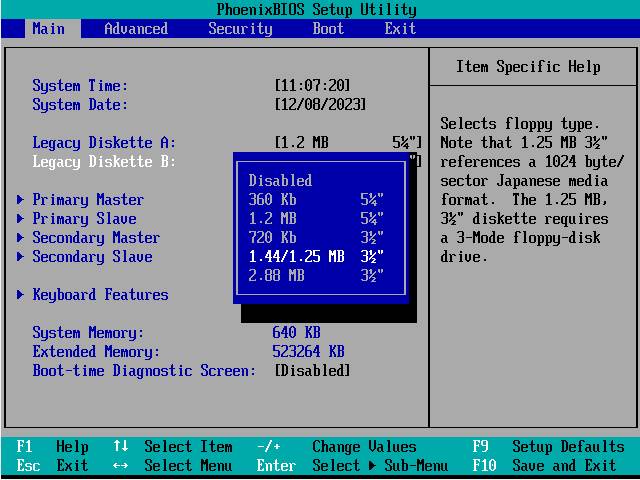
- Reboot the PC into Windows.
- Get hold of two floppy disks: one pre-formatted by another PC, the other a spare simply for reformatting.
- Reformat the spare floppy disk using Windows and check you can put files on it and read them back. This checks your BIOS is set up OK and the drive works.
- Try the pre-formatted floppy disk and make sure you can read files off it, and, if possible, write files to it and read them back. This checks the calibration of the drive is reasonable.
4.9 How do use a 3" [single-sided] floppy disk drive?
- You'll need a custom-built cable. There are people who've already done this as part of the Spectrum Disk Preservation Project at http://www.worldofspectrum.org/sdp/.
- Install the drive like a 5¼" floppy drive - see 4.7.
- Set the drive type in the BIOS to 5¼" 360kB.
4.10 Nothing was found
- Has the disk been "over-formatted"? Imation, for example, pre-format disks with 81 tracks. OmniFlop will detect the 81st track and try and accommodate it into the format (this changed in v2.00). If your format on tracks 0 to 79 is not the same as the one laid down on track 80 then OmniFlop will detect that the format is not consistent and you will get "Nothing was found". Try another disk. OmniFlop v2.00 and later give more options for this scenario.
- Check the latest driver is installed correctly. From the OmniFlop first screen, click 'Test installation'. For any drives you have installed, a long list of supported formats should be displayed, followed by a summary saying for each installed drive "Extended formats supported". From v2.01 of the wizard, a check is made on the driver version, but for versions previous to this you may be using an old driver which doesn't have all facilities.
- Check no other applications (e.g. anti-virus software) are running.
- Try another floppy disk drive.
- Try another PC. If it works there then you need to "spot the difference".
- Go to 'Diagnostics' and choose 'Get Disk map'. Send the file produced to support.
4.11 The formatting works and it works in my old equipment but OmniFlop cannot read it
- The media density is incorrect. You are using an HD disk in the PC with a format that is Double Density then using the disk on a Double-Density system (which does not recognise High Density).
- Tape up the media-sensing hole on the (High Density) floppy disk - not the write-protect hole - and retry reading the format with OmniFlop - it should now recognise the disk.

5. Using OmniFlop With Your Software
You can use the normal windows CreateFile, ReadFile, WriteFile functions along with the OmniFlop driver to access disks of formats you want to use in your own programs. This chapter describes how.
5.1 List The Formats You Need To Use
The formats you need to access must be pre-defined in the OmniFlop driver. In the OmniFlop wizard, a 'Test disk' must return a recognised format for all formats you need to access.
If the formats you want to access aren't yet recognised by OmniFlop, use the Wizard to send an e-mail to register the formats. A new driver will be created for you to test with the original disk. Once the OmniFlop Wizard confirms the format is correct, you can proceed.
You need a list of the formats you need to access as reported by the OmniFlop Wizard before you continue. To do this, you must list all the EXTENDED_MEDIA_TYPEs from the table in 3.1 that you want to use. This list must be sent to support with the request for a new driver.
Any format with an
EXTENDED_MEDIA_TYPE of FX_CUSTOM cannot be used by your own software. This
is because these formats are modelled by the OmniFlop Wizard rather than the
Note that if you use single-sided formats you should consider all possible combinations of formats for each side of the disk. Remember that both heads of the PC’s floppy drive are accessed via drive A: (or B:), so you must yourself sort out the head handling in your code (see 5.5.1) – the disk is served as one contiguous platter.
5.2 Contact The Author
You will need to supply:
- the list of formats you want access as EXTENDED_MEDIA_TYPEs from 3.1 (do not invent your own descriptions!),
- the name of your program, and
- a contact address (e-mail or web address).
At the same time you can also specify:
- If you want a reference to your program to be included in the OmniFlop documentation and web site.
- If you want a link to your website included.
In response you will receive:
- An access string to allow you to enable and disable your selected formats.
- A new driver with the formats you have chosen available to use with your access string.
- A new Wizard with your application listed under 'Get a License'. From v2.2b of OmniFlop licenses are not usually needed, either by you or your users. However, if your program causes support problems for OmniFlop then licenses can be enabled for tracing. This function is added in case this happens.
- Two header files (OmniFlop.h, OmniFlopFmtIDs.h) with constants (IOCTLs and media types) defined for use with your program.
5.3 Install The New Driver
When you receive a new driver with your formats added you will also get a new version of the OmniFlop Wizard.
- Install the new driver.
- Check the driver still works as you expect with the Wizard and your chosen formats.
5.4 Enable The Formats
Note that while your chosen formats are enabled, Windows will still try to mount floppy disks and interpret them as DOS (FAT12) format. Even worse, an anti-virus program may try to interpret the data on the alien-format disk and check it doesn't look like a virus - which it might. For this reason you should claim exclusive access to the floppy drive while your extended formats are enabled. You may also need to prompt the user at some point to turn off removable media checking in their anti-virus software.
Do not share the drive while you have enabled the
formats!
Include the headers supplied then use IOCTL_OMNIFLOP_ENABLE_EXTENDED_FORMATS like this:
bool EnableExtendedFormats(const char *szDrive, bool bEnable)
{
DWORD nBytesReturned;
// We need to enable the Extended formats without prompting the driver
// to test the media (first) - so we have to open it with Query access
// only before opening it for 'read' or write seperately.
HANDLE hMedia = CreateFile(
szDrive,
0, /* NO SHARING */
0, /* QUERY ACCESS ONLY */
NULL,
OPEN_EXISTING,
FILE_ATTRIBUTE_NORMAL | FILE_FLAG_SEQUENTIAL_SCAN,
0 /* No template file */ );
bool status = !!
DeviceIoControl(
hMedia,
bEnable ?
IOCTL_OMNIFLOP_ENABLE_EXTENDED_FORMATS :
IOCTL_OMNIFLOP_DISABLE_EXTENDED_FORMATS,
bEnable ? "XXX" : NULL, /* CHANGE THIS STRING to your access string */
bEnable ? 4 : 0, /* Length of previous parameter - DO NOT CHANGE */
NULL, 0,
&nBytesReturned,
NULL);
// Returns status == 0 and GetLastError == 0x00000005 (ERROR_ACCESS_DENIED)
// if not registered or invalid code
if (!status)
{
DWORD nError = GetLastError();
char szError[256];
ExplainError(szError, sizeof(szError));
}
CloseHandle(hMedia);
return status;
}
Your program should call EnableExtendedFormats("\\\\.\\A:", true), for example, to enable your chosen formats.
Note that GetLastError in the above code can return the following codes:
|
ERROR_INVALID_FUNCTION |
The driver is not present or an old version (pre-v2.01). |
|
ERROR_ACCESS_DENIED |
The highlighted string is incorrect or there is no license for these formats. |
|
Other |
Another Windows error has occurred. |
The value for the highlighted string ("XXX") will be supplied with the driver and headers. The additions to the driver for use with your program will be included in the next public release of the OmniFlop driver - you do not need to keep a 'special' version of the driver for use with your program. You should specify to your users that the version of the driver must be at least that supplied back to you (e.g. v2.01m). You can also check this in code using IOCTL_OMNIFLOP_GET_DRIVER_VER - the returned value must be greater than or equal to the value OMNIFLOP_DRIVER_VER in the header file supplied. The string code (highlighted) sets up the driver for the needs of your particular program.
5.5 Access The Floppy Disk
To read, for example:
HANDLE hMedia = CreateFile(
szDrive,
GENERIC_READ, /* Read access */
0, // No sharing
NULL,
OPEN_EXISTING,
FILE_ATTRIBUTE_NORMAL,
0 /* No template file */ );
To write, for example:
HANDLE hMedia = CreateFile(
szDrive,
GENERIC_WRITE,
0, // No sharing
NULL,
OPEN_EXISTING,
FILE_ATTRIBUTE_NORMAL | FILE_FLAG_NO_BUFFERING | FILE_FLAG_RANDOM_ACCESS,
0);
Note that in both cases the drive is opened for exclusive access to prevent Windows trying to access the disk.
5.5.1 Disk Order
All floppy disk access using the OmniFlop driver is in CYLINDER/HEAD/SECTOR (interleaved) order. Head 0 on the first cylinder is accessed, followed by head 1 on the same cylinder, followed by the next cylinder in the same way, and so on up to the number of cylinders. That is:
- All sectors, in order, on cylinder 0, head 0, followed by…
- All sectors, in order, on cylinder 0, head 1, followed by…
- All sectors, in order, on cylinder 1, head 0, followed by…
- All sectors, in order, on cylinder 1, head 1, and so on until…
- All sectors, in order, on cylinder 79, head 1.
Note that these numbers can vary depending on the physical format - e.g. 40-track formats only go up to track 39. The dimensions of the disk are available using IOCTL_DISK_GET_DRIVE_GEOMETRY. Extended media types are provided in the header file you get when registering with the author.
No attempt is made to change the scheme depending on the format - the OmniFlop driver does not handle logical disk formats (filing system). If this is not the ordering by which you wish to access the disk your software must translate your order into a file offset and use this on the handle returned from the floppy disk. For this, you have almost all the standard Windows tools available, but particularly:
- IOCTL_DISK_GET_DRIVE_GEOMETRY will work.
- SetFilePointer will access the disk randomly and therefore allows you to access the disk in another order.
Note that the OmniFlop driver includes certain non-uniform formats which are described below.
5.5.2 Ensoniq SQ80 Format
The geometry of the format is specified in 512-byte sectors although the underlying format uses 1024-byte sectors for all but the last sector on each track. The driver must be used with the the correct sector size - part-sectors cannot be read nor written.
5.5.3 iSlogger DDCPM Format
In tracks where FM is used rather than MFM the physical sector size is halved. To maintain the larger sector size for these tracks each individual sector has an equal amount of 0xFF bytes appended to it.
5.5.4 Computer Automation LSI-2 Format
This follows the same scheme as 5.5.3.
5.5.5 FLEX Double-Density Formats
These reduce the number of sectors in the smaller FM tracks. The sector size remains the same, however. The driver appends padding sectors (of 0xFF) to those returned for each track (i.e. each cylinder/head combination). A double-sided FM track therefore has the data from head 0, followed by padding, followed by the data from head 1, followed by more padding, so that each head always delivers the same amount of data. In this way the cylinder/head/sector ratios are maintained.
5.6 Close all Access to the Floppy Disk
Close all handles to the floppy disk using CloseHandle.
5.7 Disable The Formats
Disable the formats by opening the floppy disk drive with Query access only and use IOCTL_OMNIFLOP_DISABLE_EXTENDED_FORMATS. This is achieved (for example) by calling EnableExtendedFormats("\\\\.\\A:", false) using the function defined in 5.3.
If you do not do this then Windows will have access to your formats and the system may become unstable. The author accepts no responsibility for programs which leave their formats 'open'. If you leave the formats open and generate unnecessary support for the author then licensing for your program to access the formats may be enabled, which is inconvenient for both users and I.
5.8 Formatting a Disk
Formatting a disk is more complex than simply reading or writing the data on it. Because Windows is a multi-tasking operating system, and designed to use its own formats of floppy disks, the floppy disk must be protected from Windows while the alien disk formatting is taking place.
You will need to know:
- The MEDIA_TYPE of the format you wish to use. This may not be named the same as your format, since many different filing systems used the same physical format. The alien formats are listed in the header OmniFlop.h; note that other formats are Windows-supplied in the enumeration type MEDIA_TYPE (see the Microsoft documentation, or MSDN on-line). The extended formats declared under type EXTENDED_MEDIA_TYPE by OmniFlop.h must be cast to MEDIA_TYPE to be used wherever a MEDIA_TYPE is expected.
The sequence is:
- Enable your format(s). See 5.4.
- Open the disk drive for formatting (see 5.12). This includes:
- Lock the Media Type to your chosen format. See 5.9.
- Disable all other reading and writing from the disk while you format it. See 5.11.
- Lock the volume.
- Dismount the volume.
- Format the tracks. See 5.13
- Close the disk drive (see ). This must include:
- Unlock the volume. See 5.12.
- Re-enable read/write access to the drive for Windows. See 5.11.
- Unlock the Media Type. See 5.10.
- Disable your format(s). See 5.4.
Note that the code below is C++, but not object-oriented.
5.9 Locking The Media Type
bool LockMediaType(const char *szDrive, MEDIA_TYPE MediaType)
{
DWORD nBytesReturned;
bool status;
// We need to do this without prompting the driver to
// test the media (first) - so we have to open it with Query access only
// before opening it for 'read' or write seperately.
HANDLE hMedia = CreateFile(
szDrive,
0, /* Read access / Query access only */
0, /* Read sharing / No sharing */
NULL,
OPEN_EXISTING,
FILE_ATTRIBUTE_NORMAL | FILE_FLAG_SEQUENTIAL_SCAN,
0 /* No template file */ );
status = !!
DeviceIoControl(
hMedia,
IOCTL_OMNIFLOP_SELECT_MEDIA_TYPE,
&MediaType, sizeof(MediaType),
NULL, 0,
&nBytesReturned,
NULL);
if (!status)
{
DWORD nError = GetLastError();
char szError[256];
nError;
ExplainError(szError, sizeof(szError));
}
status = !!
DeviceIoControl(
hMedia,
IOCTL_OMNIFLOP_LOCK_MEDIA_TYPE,
NULL, 0,
NULL, 0,
&nBytesReturned,
NULL);
if (!status)
{
DWORD nError = GetLastError();
char szError[256];
nError;
ExplainError(szError, sizeof(szError));
}
CloseHandle(hMedia);
return !!status;
}
5.10 Unlocking The Media Type
bool UnlockMediaType(const char *szDrive)
{
DWORD nBytesReturned;
bool status;
// We need to do this without prompting the driver to
// test the media (first) - so we have to open it with Query access only
// before opening it for 'read' or write seperately.
HANDLE hMedia = CreateFile(
szDrive,
0, /* Read access / Query access only */
0, /* Read sharing / No sharing */
NULL,
OPEN_EXISTING,
FILE_ATTRIBUTE_NORMAL | FILE_FLAG_SEQUENTIAL_SCAN,
0 /* No template file */ );
status = !!
DeviceIoControl(
hMedia,
IOCTL_OMNIFLOP_UNLOCK_MEDIA_TYPE,
NULL, 0,
NULL, 0,
&nBytesReturned,
NULL);
if (!status)
{
DWORD nError = GetLastError();
char szError[256];
nError;
ExplainError(szError, sizeof(szError));
}
CloseHandle(hMedia);
return !!status;
}
5.11 Disabling/Enabling Read/Write Access
Note: The function returns the previous setting rather than 'success' or 'failure'.
bool EnableReadWrite(const char *szDrive, UCHAR bEnable)
{
DWORD nBytesReturned;
UCHAR bPrevious = 1; // Default to ON
// We need to enable without prompting the driver to
// test the media (first) - so we have to open it with Query access only
// before opening it for 'read' or write seperately.
HANDLE hMedia = CreateFile(
szDrive,
0, /* Read access / Query access only */
0, /* Read sharing / No sharing */
NULL,
OPEN_EXISTING,
FILE_ATTRIBUTE_NORMAL | FILE_FLAG_SEQUENTIAL_SCAN,
0 /* No template file */ );
bool status = !!
DeviceIoControl(
hMedia,
IOCTL_OMNIFLOP_ENABLE_READ_WRITE,
&bEnable, sizeof(UCHAR),
&bPrevious, sizeof(UCHAR),
&nBytesReturned,
NULL);
if (!status)
{
DWORD nError = GetLastError();
char szError[256];
nError;
ExplainError(szError, sizeof(szError));
}
CloseHandle(hMedia);
return !!bPrevious;
}
5.12 Opening For Formatting
This sequence provides access to the (unformatted) floppy disk in m_hMedia.
HANDLE m_hMedia = INVALID_HANDLE_VALUE;
bool OpenForFormat(const char *m_szDrive, MEDIA_TYPE MediaType)
{
LockMediaType(m_szDrive, MediaType);
EnableReadWrite(m_szDrive, false);
DWORD nBytesReturned;
m_hMedia = CreateFile(
m_szDrive,
GENERIC_READ | GENERIC_WRITE, // Both flags mandatory - otherwise Access denied
0, // No sharing
NULL,
OPEN_EXISTING,
FILE_ATTRIBUTE_SYSTEM | FILE_FLAG_NO_BUFFERING,
0);
if ((m_hMedia == INVALID_HANDLE_VALUE))
{
Close();
return false;
}
// Exclusive access required
if (!DeviceIoControl(
m_hMedia,
FSCTL_LOCK_VOLUME,
NULL, 0,
NULL, 0,
&nBytesReturned,
NULL)
)
{
Close();
return false;
}
// Dismount
if (!DeviceIoControl(
m_hMedia,
FSCTL_DISMOUNT_VOLUME,
NULL, 0,
NULL, 0,
&nBytesReturned,
NULL)
)
{
Close();
return false;
}
return true;
}
5.13 Closing The Format
The handle to the open disk drive is in m_hMedia.
void DriveMedia::Close()
{
if (m_hMedia != INVALID_HANDLE_VALUE)
{
DWORD nBytesReturned;
// Revoke exclusive access
DeviceIoControl(
m_hMedia,
FSCTL_UNLOCK_VOLUME,
NULL, 0,
NULL, 0,
&nBytesReturned,
NULL);
CloseHandle(m_hMedia);
}
m_hMedia = INVALID_HANDLE_VALUE;
// Make sure we always explicitly re-enable read/write access to the disk
EnableReadWrite(m_szDrive, true);
// Release any locked format
UnlockMediaType(m_szDrive);
}
5.14 Formatting Tracks
This should be performed once for every track required on the disk, i.e. every cylinder and head combination. It uses the standard Windows IOCTL, IOCTL_FORMAT_TRACKS. See the Microsoft documentation for more information. You may alter the parameters of the IOCTL_DISK_FORMAT_TRACKS at your own risk if you wish to alter its behaviour.
If you need the parameters of the format (number of cylinder, number of heads etc.) then these are available from the standard IOCTL_DISK_GET_DRIVE_GEOMETRY.
Note that this does not verify the format has been written correctly, and will blindly place an incompatible format onto media without checking. To verify the format, read it back in once written, and if it reads the track (as data) without error then the format has been successful. This is as per the standard Windows API.
bool FormatTrack(MEDIA_TYPE MediaType, DWORD nCylinder, DWORD nHead)
{
FORMAT_PARAMETERS FormatParameters;
DWORD nBytesReturned;
FormatParameters.MediaType = MediaType;
FormatParameters.StartCylinderNumber = nCylinder;
FormatParameters.EndCylinderNumber = nCylinder;
FormatParameters.StartHeadNumber = nHead;
FormatParameters.EndHeadNumber = nHead;
if (DeviceIoControl(
m_hMedia,
IOCTL_DISK_FORMAT_TRACKS,
&FormatParameters, sizeof(FormatParameters),
NULL, 0,
&nBytesReturned,
NULL))
{
return true;
}
else
{
DWORD nError = GetLastError();
if (nError == ERROR_NOT_READY)
{
strcpy(m_szError,
"The device is not ready.\n\n"
"This usually means the drive door is open,\n"
"the media is invalid (e.g. wrong density),\n"
"or the media is damaged.");
}
else
ExplainError(m_szError, sizeof(m_szError));
return false;
}
}
Note: The structure alignment for the FORMAT_PARAMETERS structure is 8 bytes, making it 40 bytes total (5 fields).